dholter
Members
-
Joined
-
Last visited
Files posted by dholter
-
Black/White & All White CHP textures for the 2010 Dodge Charger in TrevorJanssen's LSPD Police Cruiser Pack:
www.lcpdfr.com/files/file/9617-lspd-police-cruiser-pack/
Credits:
- LSPD Police Cruiser Pack compiled by TrevorJanssen
- Model is original Dodge Charger by EA Games, modified for and converted to GTAIV by Lex91.
- Modified to 2006 Dodge Charger Police Package by Lt.Caine, modified to 2010 Dodge Charger Police Package by deco.
- Taillights from NFS MW 2012.
- Wheels made by GerryStudio, Edited & converted for GTA IV by Bxbugs123, Rim textures by Bxbugs123.
- Setina BodyGuard 6/7 Partition by deca
- Federal Signal Arjent S2 by F5544
- Textures for Federal Signal Arjent S2 by BogdanM
I hope you like it.
- 125 Downloads
Submitted -
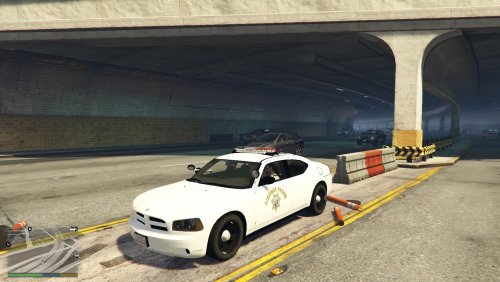
CHP skin for AlexTolle's 2010 Charger.
Link to AlexTolle model: http://www.lcpdfr.com/files/file/9304-lapd-2010-charger-ppv-rims-fedsig-arjent-fixed-hood/
I couldn't wait for a CHP skin come out for this model so I went ahead and gave my first skin a try. I did not do much: touch of black to the rear doors and pasted CHP markings but I am sure there is room for improvement so please do judge!
This skin was for my personal use but LSPDFR and the community have given me so much that in return I thought I would contribute with this skin as there are no CHP versions out there yet for this model and some of you may enjoy it until a better one comes out.
Hope you like it.
- 129 Downloads
- 4 Comments
Updated