ChrisTuffur
Members
-
Joined
-
Last visited
Files posted by ChrisTuffur
-
If you intend to redistrubute this bundled with another mod, you MUST credit me! Please credit me as "ChrisTuffur".
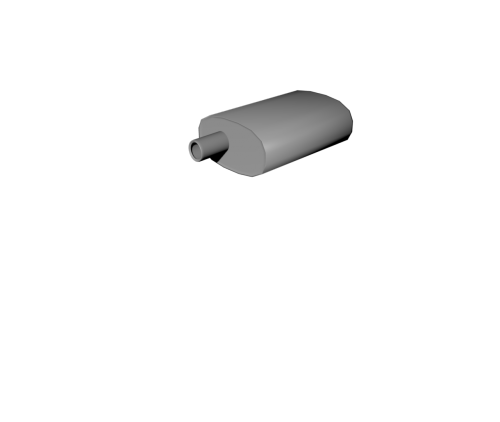
This is a basic, low poly exhaust I modeled during some free time. It's in Waveform (.obj) format, but can be imported into ZModeler.
The model isn't mapped and doesn't have any assigned materials so it will be your job to do that.
I hope it serves you well!
- 68 Downloads
Submitted -
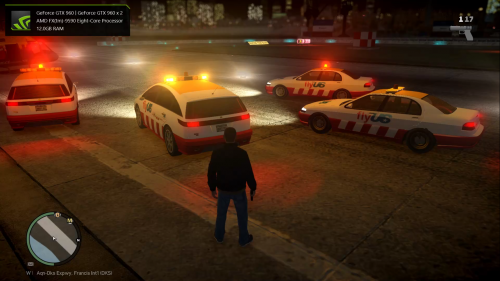
I got bored with the forgotten and frankly useless stock FlyUS vehicles in GTA IV and figured I'd update them a bit and get them on ELS.
The vehicles are stock other than the lightbar and beacon. The beacon is the stock beacon but I modified it to work with ELS.
The Feroci (feroci2) features a British spec Whelen Justice lightbar in amber along with my modified beacon.
The Perennial (perennial2) features a Whelen Edge 9000 lightbar with a modified beacon also.
Both lightbars have rear lighting (amber on the Edge, red on the Justice) as well as primary lighting. The side lights/alley lights have been removed and replaced by the beacon. The beacon can be activated using the 'L' key.
If there's anything more you'd like to know, don't hesitate to drop a comment and I'll get back to you.
Enjoy!
- 840 Downloads
Submitted -
This modification is not to be redistributed without first given permission from me, ChrisTuffur.
GTA IV Style Taxi for GTA V
==========================
Firstly, thanks for downloading.
This is a CUSTOM MODEL.
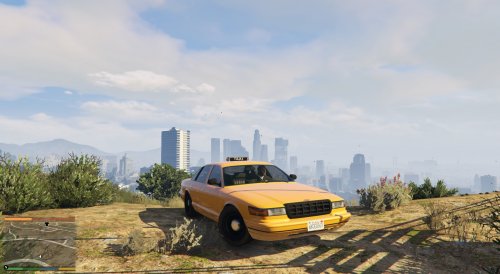
This replaces the Taxi with the GTA IV style rendition.
INSTALLATION
============
1. Open OpenIV
2. Navigate to x64e.rpf\gta5\levels
3. Open vehicles.rpf
4. Turn on Edit Mode
5. Drag and drop the files from the "GTA IV Style Taxi" folder into OpenIV
6. Close OpenIV
Done!
NOTE
====
DO NOT FORGET TO MAKE BACKUPS!
CREDITS
=======
Original model: Rockstar Games
New textures: ChrisTuffur
Model edits: ChrisTuffur
Enjoy!
- 187 Downloads
- 1 Comments
Submitted -
This modification is not to be redistributed without first given permission from me, ChrisTuffur.
CIVILIAN STANIER FOR GTA V
==========================
This is a CUSTOM MODEL.
This replaces the GTA IV styled Stanier with the GTA V rendition as used as a taxi, by the LSPD and the Blaine County Sheriff around Los Santos and Blaine County.
INSTALLATION
============
1. Open OpenIV
2. Navigate to x64e.rpf\gta5\levels
3. Open vehicles.rpf
4. Turn on Edit Mode
5. Drag and drop the files from the "Civ Stanier" folder into OpenIV
6. Close OpenIV
Done!
NOTE
====
DO NOT FORGET TO MAKE BACKUPS!
Enjoy!
- 246 Downloads
Updated -
This modification is not to be redistributed without first given permission from me, ChrisTuffur.
SPOILERLESS KURUMA FOR GTA V
===========================
This is a CUSTOM MODEL.
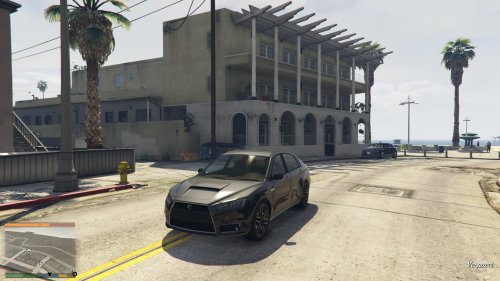
This replaces the Kuruma with a spoilerless version.
INSTALLATION
============
1. Open OpenIV
2. Navigate to x64e.rpf\gta5\levels
3. Open vehicles.rpf
4. Turn on Edit Mode
5. Drag and drop the files from the "Spoilerless Kuruma" folder into OpenIV
6. Close OpenIV
Done!
NOTE
====
DO NOT FORGET TO MAKE BACKUPS!
Enjoy!
- 112 Downloads
- 1 Comments
Submitted -
This modification is not to be redistributed without first given permission from me, ChrisTuffur.
GTA IV STYLE TAXI FOR GTA V
===========================
This is a CUSTOM MODEL.
This replaces the taxi with the GTA IV rendition.
INSTALLATION
============
1. Open OpenIV
2. Navigate to x64e.rpf\gta5\levels
3. Open vehicles.rpf
4. Turn on Edit Mode
5. Drag and drop the files from the "GTA IV Style Taxi" folder into OpenIV
6. Close OpenIV
Done!
NOTE
====
DO NOT FORGET TO MAKE BACKUPS!
Enjoy!
- 157 Downloads
- 2 Comments
Submitted -
Here's my second set of realism placements.
A Part of my ongoing project to replace all parked cars in GTA IV with more realistic placements.
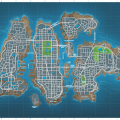
These are situated in the lower right of the map, as marked here:
Here's a video:
http://www.youtube.com/watch?v=qaxQyahQQ88
Another video:
http://www.youtube.com/watch?v=qjUQDrpLIwo
You can find my airport realism placements here:
You can follow my progress here:
http://www.facebook.com/ChrisTuffur/posts/706479972781771
- 258 Downloads
- 3 Comments
Updated -
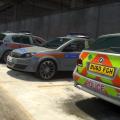
These are some realistic car placements I've made. They are based around the airport and I will be adding more of the map soon. There's utility vehicles, parked police, fire and ambulances, aircraft and a few extras too.
These are designed for DoubleDoppler's V4 Met Police Pack, but will work with any car packs and the game's original vehicles.
Here's a video showing all placements:
- 449 Downloads
- 15 Comments
Updated