wpmorrow
Members
-
Joined
-
Last visited
Files posted by wpmorrow
-
VIDEO OF LIGHTS
DO NOT REUPLOAD TO ANY OTHER SITES WITHOUT ASKING PERMISSION.
NOTE: I purchased Zmodeler one week ago today (1/30/2015.) I know there are issues with this model. I think they're minor.
The running board lights clip a slight amount. I can live with it The dashcam is in a different position, but I think it works.
Change it anything you'd like as long as you credit everyone below!
Note 2: I use Sgt. Kanyo's handeling line for the 2011 Dodge Charger R/T, found here: https://www.lcpdfr.com/topic/4338-sgtkanyos-handling-mods/
Hopefully this works for you, his handeling mods are the ONLY ones I use.
Note 3:
The Livery in the pictures is not included. I added a "Highspeed Interdiction Team" logo to Lt. Caine's black highway patrol texture that is included in the package.
It's simple to do yourself. It's IMPACT, Skewed, with fx: Stroke Blue and and Orange to Red Gradiant. If Lt. Caine says I may release the HSI texture I will in next release.
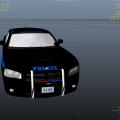
This is the 20xx charger from DSF inlocked by F5544. I've looked for this lighting setup for awhile now and have not found it.
The secondary lights are on the pushbar in front. I like how it looks. Half the lights are linked to warning lights and the code3 and Whelen are primary. An interesting side effect of my being a novice a zmod is that the only light that lights up in els cruise mode is one blue light.
I actually like this as it might identify the undercover verson of this vehichle to other officers when it might be neccesary. The ELS config included has the secondary env lights mapped out front and changed to R and B. I believe I credited everyone but if I missed you please don't get angry, just let me know and
I will fix the situation.
- 98 Downloads
- 6 Comments
Updated