metiri
Members
-
Joined
-
Last visited
Files posted by metiri
-
Installation
1.) Install Alexander Blade's ScriptHookV (http://gtaforums.com/topic/788343-vrel-script-hook-v/)
2.) Install Crosire's Community ScriptHookVDotNet (http://gtaforums.com/topic/789907-vrel-community-script-hook-v-net/)
3.) Download my mod, Metiri ANPR v0.2, which contains the following files:
- ANPR.cs
- ANPR.ini
4.) Place ANPR.cs & ANPR.ini into your "scripts" folder inside of your Grand Theft Auto V directory.
Defualt Controls (only controls so far):
NumPad5 - Activate/Deactivate mod
NumPad8 - Move radar further
NumPad2 - Move radar closer
NumPad4 - Move radar left
NumPad6 - Move radar right
NumPad7 - Move radar down (elevation)
NumPad9 - Move radar up (elevation)
NumPad1 - Flag Vehicle
NumPad3 - Scan area for flagged vehicles
INI File Specifics:
* KEYS
- Rebind keys to whatever you want
* Settings
- SnapToGround -> Snaps your marker to the ground. Still testing this... Doesn't work to well in tunnels or under overpasses. Set to true or false
- MaxDistance -> How far you can send your radar. Could impact performace, haven't checked. Set to any positive integer
- HighSpeed -> Determines the color of the speed text. If a car goes faster than whatever this is set to (along with your units) then the text turns red. If a car goes half that speed then it goes yellow. Anything lower and the text is white. Set to any positive integer. I haven't tried with low integers so there might be some bugs if you set it to something stupid like 0.
- PercentageOfHit -> How likely you are to get a violations hit. Set between 0 and 100. Anything above 100 will probably result in you getting a lot of hits and that's no fun.
- Units -> Speed units. Set to mph (miles per hour) or kph (kilometers per hour). Capitalization doesn't matter, so MpH or KPh is totally fine, but stupid.
* Advanced
- TickInterval -> Don't fuck with this unless you know what you're doing.
- 5,493 Downloads
- 14 Comments
Updated -
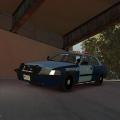
Massachusetts State Police Skin
for JokerMods' 2008 Ford Crown Victoria Police Interceptor
Thanks to JokerMods for his wonderful vehicle model, which you can get here:
This is my first skin I've ever made, so I'm open for suggestions on how to make it better, as I want to continue to make skins.
Installation:
Start OpenIV
Go to models folder
Start "Edit Mode"
Go to the .wtd for whichever model you vehicle is in, by default JokerMods model is the noose (so go to noose.wtd)
Look for cvpi_sign_1
Press "replace" and replace it with my skin.
I've only made one unit number, sorry :( Hopefully I can add more later, but it is really easy to change. The font is just Arial and it's bold.
- 72 Downloads
- 3 Comments
Updated