imadoofus
Members
-
Joined
-
Last visited
Files posted by imadoofus
-
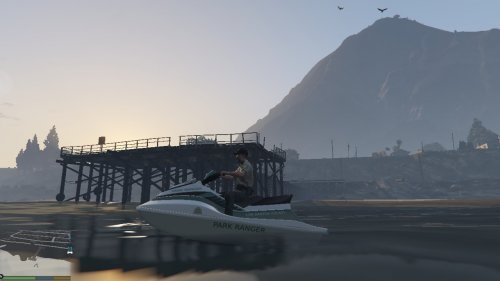
This is a skin for the Lifeguard Seashark, based on the Park Ranger livery, designed to be lore-friendly.
Installation:
Run OpenIV or SparkIV. Navigate to GTA V > x64e.rpf > levels > gta5 > vehicles.rpf. Open "seashark2.ytd" and replace "seashark2_body" with the file provided.
Other things:
This file is provided as-is. I take no responsibility for any corruptions of your game. Remember to back up your files.
You are free to use this skin as you wish, and to modify it for personal use. You are also free to use or showcase this skin in any video, as long as credit is given to me for its creation. Distribution of this skin, modified or not, requires my express permission; contact me via private message if you wish to discuss this.
- 97 Downloads
Submitted -
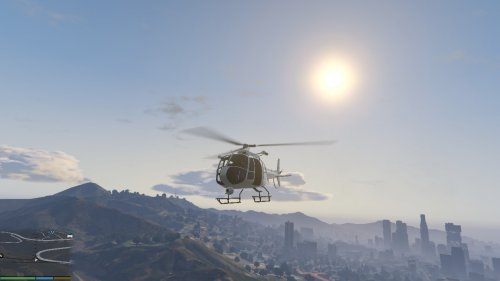
This is an all-white Sheriff texture for the police Maverick (polmav).
Installation:
Enter OpenIV, GTA V configuration. Navigate to GTA V > update > x64 > dlcpacks > patchday3ng > dlc.rpf > x64 > levels > gta5 > vehicles.rpf. Click "Edit mode" next to the file path and drag both .png files included in the .zip into vehicles.rpf.
Use:
You are free to use this texture and to modify it for personal use. You may use it in videos, as long as I am credited. If you wish to edit any part of this file and distribute it, you must contact me so we can arrange the details. Do not upload this anywhere without my permission.
- 65 Downloads
- 2 Comments
Submitted -
This is a pack containing a total of seven textures for GTA V vehicles, in a NOOSE livery primarily based on the Federal Protective Service.
Contents:
NOOSE Buffalo
NOOSE Burrito
NOOSE Cruiser
NOOSE Cruiser K-9
NOOSE Granger
NOOSE Granger K-9
NOOSE Granger ESU
Vehicles used are contained in the readme.
You are free to use these skins in any videos, and to modify them for personal use only.
- 140 Downloads
- 6 Comments
Submitted -
This is a skin for the Lenco BearCat armored police vehicle. I opted against going for straight black coloration and instead made the skin a very dark gray. Tell me what you like and dislike, and if you'd like to see similar texture work on another vehicle.
The BearCat model used in the screenshots is here:
http://www.gtainside.com/en/download.php?do=detail&cat=371&id=46349
You are free to use this skin in any video provided you give proper credit, and to modify it for personal use. If you wish to modify this skin and upload it to a public site, please contact me via private message.
- 346 Downloads
- 2 Comments
Updated -
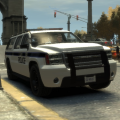
This is an FIB police skin for the GTA V Declasse Granger. It is based on the livery of the FBI Police. I'm not entirely satisfied with the way part of it turned out; the front of the black-and-blue strip terminates into the front of the SUV very unnaturally. Unfortunately, this was the best I could make it look; I may figure out how to curve the line downwards toward the headlights while looking natural and rerelease this skin in a pack, along with a Buffalo. As always, be sure to tell me what you like and dislike about the skin, and let me know if you'd like to see more of the FIB police.
For more information on the model, view the included readme file.
- 114 Downloads
- 1 Comments
Submitted -
This is a fictional livery created for Khanage's Declasse Granger exported from GTA V, downloadable from this pack:
I attempted to create similar skins for other vehicles in the pack, but they came out looking less than ideal and I decided to simply upload this. As always, make sure to tell me what you like and dislike. You have my permission to use this skin in any video, and to modify it for personal use only.
- 15 Downloads
- 8 Comments
Submitted -
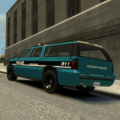
This is a pack containing two skins - for Cj24's Tahoe and Crown Victoria Police Interceptor.
The skins themselves are fire and rescue liveries for Francis International Airport, not based off of any real livery. Please let me know what can be improved and what else you would like to see, as this helps me and the community at the same time. The more constructive the review, the better. This pack will most likely work best with gangrenn's firefighter mod.
- 59 Downloads
- 2 Comments
Submitted -
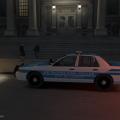
This is a skin I made for the Cj24 CVPI (though it may work on other CVPI models as well). It is not based on any real-life livery.
There is only one skin; if the reviews of this skin are favorable, I may create Charger and Tahoe skins as well going off of this base, as well as multiple liveries (and possibly an Impala at some point). Otherwise, I will look through the skin and see what can be improved and changed for the better before moving forward. Therefore, feedback is greatly appreciated, and the more detail, the better. If you do like this skin, let me know what else you wish to see out of this livery.
- 33 Downloads
- 2 Comments
Updated -
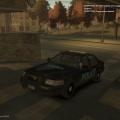
This is a simple skin for the Cj24 ELS Ford Crown Victoria (though it may work for other Crown Vics as well). It's more of a practice skin than anything, so it's not very complex or professional-looking. I thought I'd post it here and see if anyone liked it. Let me know if there's anything I can improve.
- 26 Downloads
- 3 Comments
Updated