


liamxxs
Members
-
Joined
-
Last visited
Everything posted by liamxxs
-
Nice one, seems as though trainerv conflicts with RAGE, thank you
-
Did you add the "uh1nasa" folder to dlcpacks folder?
-
Id up RAM to be honest, at least 16GB, thats just so your covered, but GTAV should run on that rig
-
Totally agree with Original Light, theres probably no software out there that will make your PC run faster, its all about your specs, so CPU, GPU,RAM,etc etc, just out curiosity, whats your current system specs?
-
Not sure im in the right section here but here goes, when i call for backup the vehicles spawn like normal, but then they dont move,they just sit there in the road trying to move, you can see them rocking back and forth, and i have never encountered this issue before, any help would greatly appreciated.
-
Tried all the above and nothing worked, so i tried deleting a few save games, that seemed to do the trick, guess i had dodgy save game. Thanks for your help :)
-
I'm on desktop, only have 5/6 plugins and using custom visuals, was doing the same thing Visual IV. Strange though because before I reinstalled I had loads of plugins, must of been around 20 and never had this issue. Will give those a go see what happens
-
So monday night i reinstalled GTA V, added LSPDFR back on and the latest versions of mods etc. Since reinstalling GTA V has started to lag, stutter and run slow. Even using console to spawn cars takes nearly a minute for the vehicle to appear, where as before it pretty much instant, im also getting slow loading textures, iv lowered alot of settings and still no change, if anyone can help i would really appreciate it.
-
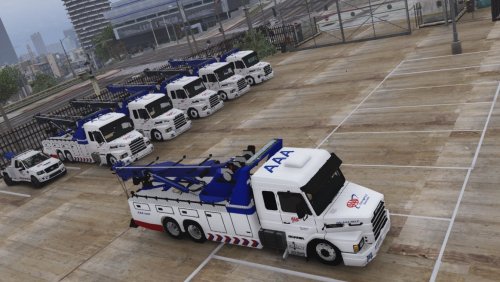 Sounds good on all counts, only asked about the rotating boom and higher lift as iv been watching Highway Thru Hell on Netflix, where they use these trucks, haha, thanks again. This one:
- 21 comments
- 2 reviews
-
-

- 1
-
-
Lets me play for around 5mins then crashes, does anyone recognize what this is: [2017-01-10 21:38:13.865] [ ERROR ] * Setting error condition [2017-01-10 21:38:13.865] [ ERROR ] * Category: 1 (ERROR_CATEGORY_LAUNCHER) [2017-01-10 21:38:13.866] [ ERROR ] * Code: 107 (LAUNCHER_ERR_GAME_CRASHED) [2017-01-10 21:38:13.866] [ ERROR ] * Extra: [2017-01-10 21:38:13.866] [ ERROR ] * Localised: Launcher error. Code: 107 [2017-01-10 21:38:13.866] [ ERROR ] ************************************************************************ [2017-01-10 21:38:13.869] [ ERROR ] Unable to read out-file! [2017-01-10 21:38:13.872] [ ERROR ] ************************************************************************ [2017-01-10 21:38:13.872] [ ERROR ] * Setting error condition [2017-01-10 21:38:13.873] [ ERROR ] * Category: 5 (ERROR_CATEGORY_EXIT_CODE) [2017-01-10 21:38:13.873] [ ERROR ] * Code: -1 (ffffffff) [2017-01-10 21:38:13.873] [ ERROR ] * Extra: [2017-01-10 21:38:13.873] [ ERROR ] * Localised: Grand Theft Auto V exited unexpectedly. Im not sure what that error is,
-
Iv got the same issue, awesome truck though. Be good if he could get the boom arm to rotate and lift higher.
- 21 comments
- 2 reviews
-
-
- 1
-
-
 So iv downloaded the updated version, now my ELS doesn't work at work, it says i have faulty VCF files, yet it was working fine before the update, any ideas would be great. UPDATE: After installing the first version, im now the getting the same issue.
- 2,690 comments
- 236 reviews
-
I know how to install cars lol, I mean with RDE all my police cars went back to default, and are now spread out in 3 RDE vehicle folders, think i sussed it, thanks for your help :)
-
So i downloaded RDE, only issue i have now is i don't have a clue how to install custom cars. Obviously most of the cars i was using have been overwritten, but some still remain
-
I bought the disk version when GTA V first came out, really bad idea now i think about it. If you don't have GTA V on separate HDD and your main HDD fails your screwed, even more so when you lose 1 disk like i did. Iv now got the steam version, makes life a whole lot easier, should of got steam version in the first place, but i like disks lol, not going to be making that mistake again.
-
SOLVED. It appears that when i changed the binding for the ELS Menu to CTRL+U, it made ALT+U useless, so had to bind the PRML to a different key.
-
Only binding I changed was CTRL+P to CTRL+U. Unless changing it to that makes it stop working.
-
So ELS is working fine, only issue i have is that my ALT key isn't doing anything when i press it, like ALT+U, ALT+I etc, also i can't seem to change the lighting pattern for PRML either, any help would be great. Thanks
-
You also need to have "Scroll Lock" ON
-
I know, but if its one of your plugins it should say in the log file
-
Please upload your ragepluginhook.log file, also it looks as though a few of your plugins need updating
-
You need to upload the ragehook log, its in your GTA V installation directory
-
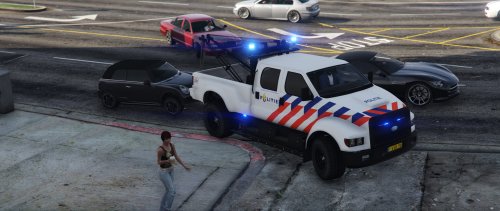 Great Towtruck, only issue iv got is that when the beacons are on, one of them is reflecting red onto buildings, etc
- 7 comments
- 1 review
-
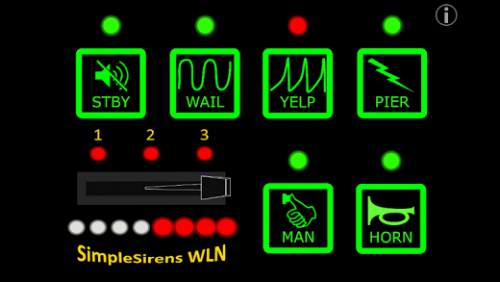 Sorted, i needed to delete an xml in Albo1125.Common folder in main GTA V directory. All is working fine now, thanks for your help :)
- 24 comments
- 1 review
-
-
- 1
-
-
 SOLVED, found the issue on page 14. Wondering if anyone could help me, Siren Mastery was working the other day but all of a sudden it crashes as soon it loads, any help would be much appreciated, 40:25 PM.190] SirenMastery: ==============================[9/18/2016 1:40:25 PM.190] SirenMastery: UNHANDLED EXCEPTION DURING GAME FIBER TICK[9/18/2016 1:40:25 PM.191] SirenMastery: ------------------------------[9/18/2016 1:40:25 PM.191] SirenMastery: Origin: Game fiber "Plugin "SirenMastery" main fiber".[9/18/2016 1:40:25 PM.192] SirenMastery: ------------------------------[9/18/2016 1:40:25 PM.192] SirenMastery: Exception type: System.Xml.XmlException[9/18/2016 1:40:25 PM.192] SirenMastery: Exception message: '.', hexadecimal value 0x00, is an invalid character. Line 1, position 1.[9/18/2016 1:40:25 PM.193] SirenMastery: ------------------------------[9/18/2016 1:40:25 PM.193] SirenMastery: Inner exceptions:[9/18/2016 1:40:25 PM.194] SirenMastery: ------------------------------[9/18/2016 1:40:25 PM.194] SirenMastery: Stack trace:[9/18/2016 1:40:25 PM.195] SirenMastery: at System.Xml.XmlTextReaderImpl.Throw(Exception e)[9/18/2016 1:40:25 PM.195] at System.Xml.XmlTextReaderImpl.ParseRootLevelWhitespace()[9/18/2016 1:40:25 PM.195] at System.Xml.XmlTextReaderImpl.ParseDocumentContent()[9/18/2016 1:40:25 PM.196] at System.Xml.Linq.XDocument.Load(XmlReader reader, LoadOptions options)[9/18/2016 1:40:25 PM.196] at System.Xml.Linq.XDocument.Load(String uri, LoadOptions options)[9/18/2016 1:40:25 PM.197] at Albo1125.Common.UpdateChecker.VerifyXmlNodeExists(String Name, String FileID, String DownloadLink, String Path)[9/18/2016 1:40:25 PM.197] at SirenMastery.EntryPoint.Main()[9/18/2016 1:40:25 PM.197] at Rage.GameFiber.Main()[9/18/2016 1:40:25 PM.198] SirenMastery: ==============================[9/18/2016 1:40:25 PM.198] SirenMastery: [9/18/2016 1:40:25 PM.211] SirenMastery: Cleaning up[9/18/2016 1:40:25 PM.213] SirenMastery: SirenMastery 1.3.4.2, developed by Albo1125, has been cleaned up.
- 851 comments
- 108 reviews
-
-
- 1
-

