




V E K T R 0 .
Members
-
Joined
-
Last visited
Everything posted by V E K T R 0 .
-
It's due to the amount of people shooting.
-
I use the same sound pack that he does. Here you go: https://www.gta5-mods.com/weapons/insurgency-sound-mod
-
Keybindings for both Arrest Manager and Traffic Policer can be found at the bottom of their .ini files (Grand Theft Auto V/Plugins/LSPDFR/Arrest Manager.ini) and (Grand Theft Auto V/Plugins/LSPDFR/Traffic Policer.ini).
-
When installing it, make sure to follow all the instructions that are provided by Albo1125. Instructions will be available in the downloaded file, which you'll need to extract.
-
If you're referring to the Drug Runners callout, it comes as part of Traffic Policer:
-
Here are some suggestions that I can provide, as you haven't provided any helpful info: Try installing minimal mods. By this, I mean take a clean game install, then install ScriptHookV, LSPDFR, THEN install RAGE Plugin Hook. The reason that you want to install RAGE Plugin Hook (v0.51) after LSPDFR is because LSPDFR 0.3.1 comes packaged with an very old version of RPH (v0.36, I believe), which won't work with the current game version (1.0.1101.1). Don't install any LSPDFR plugins until you can verify that LSPDFR works properly by itself. If it works, back up your installation so that in the event something breaks your game installation in the future, you can revert to a working game installation.
-
I just installed a few .oiv packages without a single error popping up. Have you tried restarting OpenIV to see if the issue is still present?
-
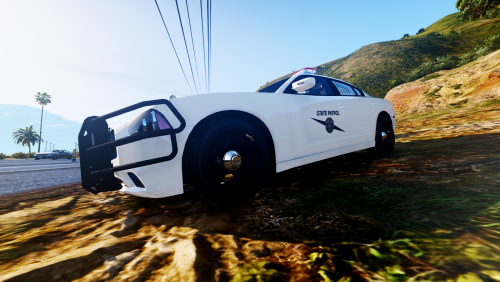 It was made for the fun of it. I highly doubt that WASP actually has a Hellcat Challenger.
- 4 comments
- 6 reviews
-
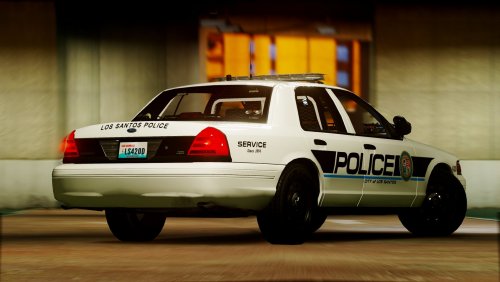 VEKTR0creations brings you a new texture pack of the Puyallup Police Department from Washington State. For anyone who's wondering, Puyallup is a town located roughly 40 miles south of Seattle, home to the Washington State Fair (formerly known as the Puyallup Fair), and was my town of residence for 6 years. Seen here is an early version, which is stictly for Bxbugs123's 2011 Ford Crown Victoria Police Interceptor. This release includes the realistic textures, as well as lore-friendly textures to help fit better into YOUR game. Future updates will bring support for Thehurk's well-known 2016 Ford Explorer Police Interceptor Utility, and other vehicles (I hope to work on a 2013 Ford Explorer and 2008 Chevrolet Tahoe, possibly a 2012-2016 Ford Police Interceptor). This texture pack is not a finished project, with plans to add on to it in later updates. VIDEO SHOWCASE I've gone ahead and uploaded an episode of my 'San Andreas: Law' series on my YouTube channel, which shows off the new texture on Bxbugs123's 2011 Ford Crown Victoria Police Interceptor! Check it out, here: PLEASE NOTE I AM NOT TAKING REQUESTS AT THIS TIME FOR ANY DEPARTMENTS, VEHICLES, OR ANYTHING ELSE. THIS IS DUE, IN PART, TO THE FACT THAT I'M BUSY TRYING TO GET MY LIFE BACK TOGETHER, WHILE STILL DEALING WITH MY ACTUAL JOB. THANK YOU.
 -
I know that it has been a while since I've posted anything to this site, but don't worry, it's not because of any issues I've been having with anything/anyone here. I've just been really busy with work, personal issues, and trying to brainstorm for videos and texture packs. But anyway, here is a project that I've worked on a little bit, which resembles the Puyallup Police Department in Washington State. While I currently only have textures made for the 2011 Ford Crown Victoria Police Interceptor by Bxbugs123, I do have plans to add support for other vehicles. I'll be releasing the CVPI textures very soon, and other vehicles will follow as updates to the pack. Starting out, the pack already features 4 versions, as follows: - Black & White; Realistic - Black & White; Lore-Friendly - White; Realistic - White; Lore-Friendly The realistic versions include the Puyallup text, Washington license plates, and unit numbers resemble 4 area codes near Puyallup (206, 253, 360, & 425). The lore-friendly versions feature Los Santos text, San Andreas license plates, and unit numbers that may have meaning to me, or fit with the game (104, 169, 221, & 420). While updates won't be releasing consistantly, I do hope to get them out fairly soon. Click here to view my video showcase of the texture!
-
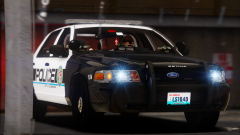
From the album: Puyallup PD [WA] - Texture Pack
Seen here is a peek at the black & white, lore-friendly variant of the Puyallup PD [WA] texture for Bxbugs123's 2011 Ford Crown Victoria Police Interceptor.© Romanel Fleming
-
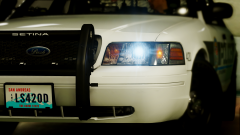
From the album: Puyallup PD [WA] - Texture Pack
Seen here is a peek at the white, lore-friendly variant of the Puyallup PD [WA] texture for Bxbugs123's 2011 Ford Crown Victoria Police Interceptor.© Romanel Fleming
-
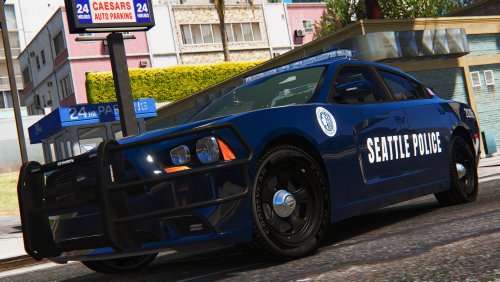 It may take a while, as the next update is supposed to be pretty big and may take a while to do, since I've been a bit busier with work, my personal life, and with my YouTube channel.
- 21 comments
- 7 reviews
-
-
New update is out, now. This update adds lore-friendly versions for 3 vehicles. I hope y'all enjoy!
- 21 comments
- 7 reviews
-
![The Lore-Friendly Update [v1.1]](//s3-gallery.int-cdn.lcpdfrusercontent.com/monthly_2017_02/small.58947bcb142ee_GTA52017-02-0222-32-38-31.png.df9f93901bf1e237a76bac4bb5304e79.png)
From the album: Seattle PD [WA] - Texture Pack
When I recently released my Seattle PD texture pack, I began to receive requests to make the pack lore-friendly. Well, that's what the first update to the texture pack will be focused on. Seen here is the dark-blue striped texture for Bxbugs123's 2011 Ford Crown Victoria, with "Los Santos" instead of "Seattle", "San Andreas" instead of "Washington", and "The Crime State" instead of "Evergreen State". On top of that the license plates also feature ###LSPD instead of ###-SPD. The blue badge on the sides also have been changed.© Romanel G. Fleming
-
![The Lore-Friendly Update [v1.1]](//s3-gallery.int-cdn.lcpdfrusercontent.com/monthly_2017_02/small.58947bc757ad7_GTA52017-02-0222-32-14-74.png.f5f02d7a53267170826d67f543f5ef4e.png)
From the album: Seattle PD [WA] - Texture Pack
When I recently released my Seattle PD texture pack, I began to receive requests to make the pack lore-friendly. Well, that's what the first update to the texture pack will be focused on. Seen here is the dark-blue striped texture for Bxbugs123's 2011 Ford Crown Victoria, with "Los Santos" instead of "Seattle", "San Andreas" instead of "Washington", and "The Crime State" instead of "Evergreen State". On top of that the license plates also feature ###LSPD instead of ###-SPD. The blue badge on the sides also have been changed.© Romanel G. Fleming
-
![The Lore-Friendly Update [v1.1]](//s3-gallery.int-cdn.lcpdfrusercontent.com/monthly_2017_02/small.58947bc40a986_GTA52017-02-0222-32-00-07.png.51b3a7160de7f7cf48da80bcedc8d056.png)
From the album: Seattle PD [WA] - Texture Pack
When I recently released my Seattle PD texture pack, I began to receive requests to make the pack lore-friendly. Well, that's what the first update to the texture pack will be focused on. Seen here is the dark-blue striped texture for Bxbugs123's 2011 Ford Crown Victoria, with "Los Santos" instead of "Seattle", "San Andreas" instead of "Washington", and "The Crime State" instead of "Evergreen State". On top of that the license plates also feature ###LSPD instead of ###-SPD. The blue badge on the sides also have been changed.© Romanel G. Fleming
-
-
Due to the amount of people who want lore-friendly textures, I will be working on updates for both this texture pack and my King County Sheriff texture pack to add lore-friendly versions. At this time, I'm not taking any requests for new textures. Please take a look at the last sentence in the description. Thank you.
- 21 comments
- 7 reviews
-
VEKTR0creations, for the third time around, brings you a texture pack based out of Washington State. This time, it's of the Seattle Police Department, featuring both previously-released work as well as fresh, new work. Included in the first part of this pack is my old textures for YCA-RE's 1999 Ford Crown Victoria and Cj24 & F5544's 2008 Ford Crown Victoria. Also included are new textures for Bxbugs123's 2011 Ford Crown Victoria, Thehurk's 2016 Ford Police Interceptor Utility (Explorer), and OfficerUnderwood's 2016 Ford Police Interceptor (Taurus). The Lore-Friendly Update [v1.1] The first update to this texture pack adds lore-friendly versions, though only for certain textures. The lore-friendly versions are for Bxbugs123's 2011 Ford Crown Victoria, OfficerUnderwood's 2016 Ford Police Interceptor, and Thehurk's 2016 Ford Police Interceptor Utility (only for the newest texture). I don't plan to make lore-friendly versions for YCA-RE's 1999 Ford Crown Victoria and Cj24's 2008 Ford Crown Victoria, as they are older models that aren't as popular anymore. It's also worth noting that I don't have the original projects for these textures, so they would need to be completely remade. The Modern Update [v1.2] The second update to this texture pack is the biggest. Starting off, I'm adding Seattle PD's newer, modern design to Bxbugs123's 2011 Ford Crown Victoria Police Interceptor. Second, I'm adding textures for a new vehicle, the 2014 Dodge Charger by Bxbugs123 and Carperino (Fartknockr). As if that's not enough, I've also made the new designs available in 4K, in addition to the usual 2K, to help players with powerful enough rigs be able to enjoy a crisper experience. This texture pack is a finished project, with NO plans to add on to it in later updates. VEHICLES: 1999 Ford Crown Victoria Police Interceptor Model and Template by YCA-RE 2008 Ford Crown Victoria Police Interceptor Model from Driver San Francisco Template by Cj24 2011 Ford Crown Victoria Police Interceptor Model and Template by Bxbugs123 2016 Ford Police Interceptor Utility (Larger Version) Model and Template by Thehurk 2016 Ford Police Interceptor Model and Template by OfficerUnderwood VIDEOS: VEKTR0 @acepilot2k7 Toxic Master
- 21 comments
- 7 reviews
-
-

- 6
-
-
The way that I typically take my screenshots is I record a Rockstar Editor clip, then go into Rockstar Editor, use the Free Camera option, and hide the HUD. From there, I use Fraps or Nvidia Share (previously known as ShadowPlay) to take my screenshots.
-
Screenshots for my first update [v1.1] to the Washington State Patrol [WA] texture pack!
-
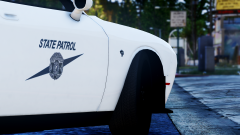 2016 SRT PotatoCat [MrPotato]
-
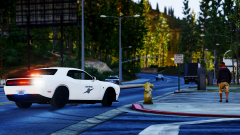 2016 SRT PotatoCat [MrPotato]
-
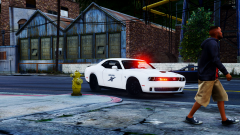 2016 SRT PotatoCat [MrPotato]
-
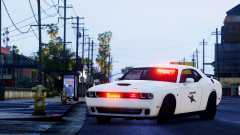 2016 SRT PotatoCat [MrPotato]
-
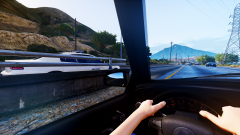 2015/2016 Dodge Charger [OfficerUnderwood // ablaze]
-
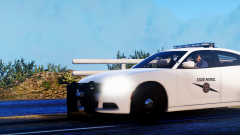 2015/2016 Dodge Charger [OfficerUnderwood // ablaze]
-
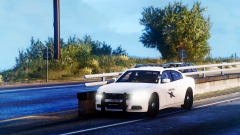 2015/2016 Dodge Charger [OfficerUnderwood // ablaze]
-
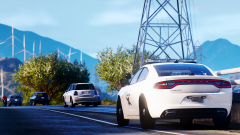 2015/2016 Dodge Charger [OfficerUnderwood // ablaze]
-
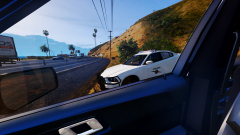 2014 Dodge Charger [Bxbugs123 & Carperino // Maurice97]
-
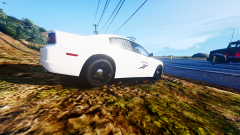 2014 Dodge Charger [Bxbugs123 & Carperino // Maurice97]
-
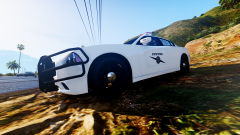 2014 Dodge Charger [Bxbugs123 & Carperino // Maurice97]
-
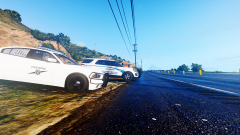 2014 Dodge Charger [Bxbugs123 & Carperino // Maurice97]
-
-
From the album: Washington State Patrol [WA] - Texture Pack [v1.1]
Vehicle Model: -
From the album: Washington State Patrol [WA] - Texture Pack [v1.1]
Vehicle Model:

![The Lore-Friendly Update [v1.1]](http://s3-gallery.int-cdn.lcpdfrusercontent.com/monthly_2017_02/small.58947bcb142ee_GTA52017-02-0222-32-38-31.png.df9f93901bf1e237a76bac4bb5304e79.png)
![The Lore-Friendly Update [v1.1]](http://s3-gallery.int-cdn.lcpdfrusercontent.com/monthly_2017_02/small.58947bc757ad7_GTA52017-02-0222-32-14-74.png.f5f02d7a53267170826d67f543f5ef4e.png)
![The Lore-Friendly Update [v1.1]](http://s3-gallery.int-cdn.lcpdfrusercontent.com/monthly_2017_02/small.58947bc40a986_GTA52017-02-0222-32-00-07.png.51b3a7160de7f7cf48da80bcedc8d056.png)
