Commander2706
Members
-
Joined
-
Last visited
Files posted by Commander2706
-
DOA Livery for the 2014 Chevy Impala from Bxbugs123
INFORMATION FOR ALL DO AGENTS
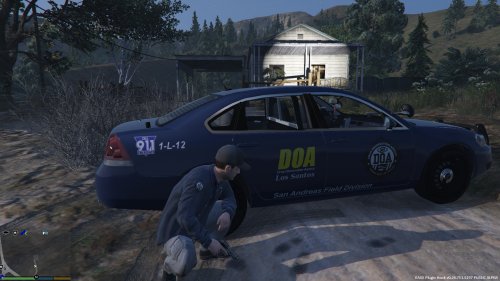
The refitting of the Chevrolet Impala vehicle pool has been initialized. The new livery comes on a steel blue metallic paint with the seal of the Drug Observation Agency on both front doors and a striking yellow lettering on each of the rear doors. As a reminder for each civilian the dial-911 emergency tag has been added. The rear bumper now shows stickers of the D.A.R.E. program. This is also considered to be a warning. As we lack good agents, an e-mail address has been added above the obligatory sticker of the American Flag.
Thanks to Agent Miller for the excellent photography. The old lady in the shack had been scared to death, but you can now get the idea of our new livery.
Now get in the vehicles and kick some narco-butts out there.
ADDITIONAL INFORMATION
Please do not redistribute or re-upload my work.
All credit for the vehicle model goes to Bxbugs123.
You can find the model here: http://www.lcpdfr.com/files/file/8764-2014-chevrolet-impala-ppv-umuc/
The readme file contains the installation. I am not responsible for any damage done to your computer, always make backup files.
If you have any suggestions for other liveries or changes, let me know!
The screenshots of the vehicle are not up to date. I made some minor tweaks here and there.
The e-mail address on the vehicle is fake. ... duh ...
Have fun :)
- 169 Downloads
- 2 Comments
Updated