


Alter481
Members
-
Joined
-
Last visited
Everything posted by Alter481
-
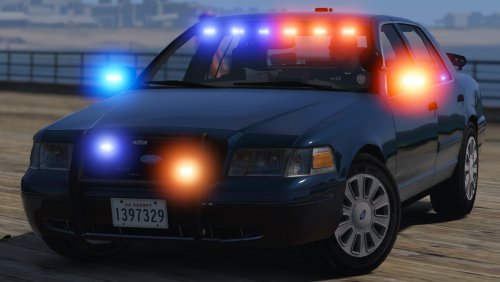 Noticed this glitch/bug with this vehicle. When you open door or have the driver side window down the speedometer is glitched/bugged with white lights. I compared it to other 2011 cvpi's and didnt see this problem/glitch. I submitted photos below as examples. Please fix these issues. Thank you!
- 70 comments
- 26 reviews
-
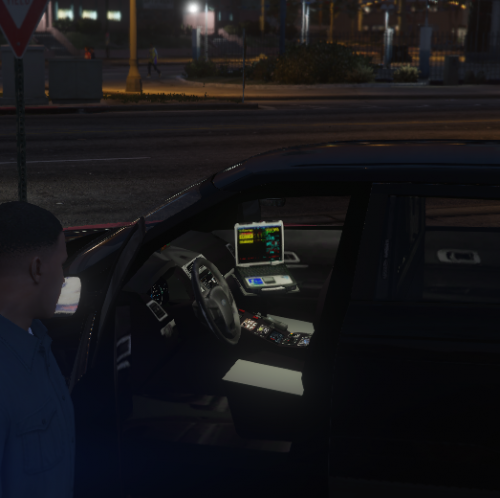 there was a error with the upload, kept getting error code -200, got in touch with a community member they will handle it. Thank you for your concern sir!
 -
-HAD TO RE UPLOAD DOWNLOAD DUE TO COPYRIGHT ISSUES -PLEASE DO NOT EDIT OR RE UPLOAD WITHOUT MY PERMISSION -PLEASE NOTE THESE TEXTURES ARE NOT HD- -PLEASE NOTE THIS WAS NOT THOROUGHLY WORKED ON(FAST PACE UPLOAD) meaning created without spending much time on. There will be a update for this upload. -THESE TEXTURES CAN BE USED IN GTA V AND GTA IV -Credits- -brandonct22 for original tough book texture blank template(gtaiv) -google images(screens) -policeimages -brandonct22 for template outlining I present to you basic police laptop textures with edited screens! These textures are not HD nor do they produce lighting. These texture screens are screens that I found on the internet and I worked/fit into the laptop texture to fit the(screen).Reason for making of texture? Seen alot of people/members on LSPDFR.COM asking creators of vehicle mods to have the computer/laptop screen have picture(edited screens) or have the screen have light. You will notice these textures are some what hard to read on the screen, there will be an update to this file containing HD textures, and easy read text! (more textures in the download!) -INSTALL- ****Please note these textures are basic textures that will not work on ALL VEHICLES**** Basic install is easy! -Just follow these steps below: -using Open IV -Navigate to what vehicle you are attempting to change (example if I wanna edit the laptop texture for FBI- x64e.rpf/levels/gta5/vehicles.rpf "find FBI" and edit the fbi.ytd texture) - you are going to have to edit the .ytd texture -Once inside the .ytd texture you need to find the name "toughbook" or find the basic/close to texture in the .ytd -once you find the file that contains the file "toughbook" or image that matches the toughbook texture included in this download -find the word "replace" -replace the texture with the texture you would like to use included in this download -click "save" -close Open IV If you run into any bugs/crashes after using these textures, feel free to message me! My Youtube channel:https://www.youtube.com/channel/UCTJR1v9UdBwmZfNdRqJHuTQ **I AM NOT RESPONSIBLE FOR ANY CRASHES YOU IN COUNTER WHEN USING THESE TEXTURES** **these textures have been tested on two laptops/two lspdfr.com members** **special thanks to brandonct22 for testing** below are examples of where you can install these textures to!
-
 -HAD TO RE UPLOAD DOWNLOAD DUE TO COPYRIGHT ISSUES -PLEASE DO NOT EDIT OR RE UPLOAD WITHOUT MY PERMISSION -PLEASE NOTE THESE TEXTURES ARE NOT HD- -PLEASE NOTE THIS WAS NOT THOROUGHLY WORKED ON(FAST PACE UPLOAD) meaning created without spending much time on. There will be a update for this upload. -THESE TEXTURES CAN BE USED IN GTA V AND GTA IV -Credits- -brandonct22 for original tough book texture blank template(gtaiv) -google images(screens) -policeimages -brandonct22 for template outlining I present to you basic police laptop textures with edited screens! These textures are not HD nor do they produce lighting. These texture screens are screens that I found on the internet and I worked/fit into the laptop texture to fit the(screen).Reason for making of texture? Seen alot of people/members on LSPDFR.COM asking creators of vehicle mods to have the computer/laptop screen have picture(edited screens) or have the screen have light. You will notice these textures are some what hard to read on the screen, there will be an update to this file containing HD textures, and easy read text! -INSTALL- ****Please note these textures are basic textures that will not work on ALL VEHICLES**** Basic install is easy! -Just follow these steps below: -using Open IV -Navigate to what vehicle you are attempting to change (example if I wanna edit the laptop texture for FBI- x64e.rpf/levels/gta5/vehicles.rpf "find FBI" and edit the fbi.ytd texture) - you are going to have to edit the .ytd texture -Once inside the .ytd texture you need to find the name "toughbook" or find the basic/close to texture in the .ytd -once you find the file that contains the file "toughbook" or image that matches the toughbook texture included in this download -find the word "replace" -replace the texture with the texture you would like to use included in this download -click "save" -close Open IV If you run into any bugs/crashes after using these textures, feel free to message me! My Youtube channel:https://www.youtube.com/channel/UCTJR1v9UdBwmZfNdRqJHuTQ **I AM NOT RESPONSIBLE FOR ANY CRASHES YOU IN COUNTER WHEN USING THESE TEXTURES** **these textures have been tested on two laptops/two lspdfr.com members** **special thanks to brandonct22 for testing** below are images containing examples of where you can install these textures
 -
 -HAD TO RE UPLOAD DOWNLOAD DUE TO COPYRIGHT ISSUES -PLEASE DO NOT EDIT OR RE UPLOAD WITHOUT MY PERMISSION -PLEASE NOTE THESE TEXTURES ARE NOT HD- -PLEASE NOTE THIS WAS NOT THOROUGHLY WORKED ON(FAST PACE UPLOAD) meaning created without spending much time on. There will be a update for this upload. -THESE TEXTURES CAN BE USED IN GTA V AND GTA IV -Credits- -brandonct22 for original tough book texture blank template(gtaiv) -google images(screens) -policeimages -brandonct22 for template outlining I present to you basic police laptop textures with edited screens! These textures are not HD nor do they produce lighting. These texture screens are screens that I found on the internet and I worked/fit into the laptop texture to fit the(screen).Reason for making of texture? Seen alot of people/members on LSPDFR.COM asking creators of vehicle mods to have the computer/laptop screen have picture(edited screens) or have the screen have light. You will notice these textures are some what hard to read on the screen, there will be an update to this file containing HD textures, and easy read text! (more texture in the download!) -INSTALL- ****Please note these textures are basic textures that will not work on ALL VEHICLES**** Basic install is easy! -Just follow these steps below: -using Open IV -Navigate to what vehicle you are attempting to change (example if I wanna edit the laptop texture for FBI- x64e.rpf/levels/gta5/vehicles.rpf "find FBI" and edit the fbi.ytd texture) - you are going to have to edit the .ytd texture -Once inside the .ytd texture you need to find the name "toughbook" or find the basic/close to texture in the .ytd -once you find the file that contains the file "toughbook" or image that matches the toughbook texture included in this download -find the word "replace" -replace the texture with the texture you would like to use included in this download -click "save" -close Open IV If you run into any bugs/crashes after using these textures, feel free to message me! My Youtube channel:https://www.youtube.com/channel/UCTJR1v9UdBwmZfNdRqJHuTQ **I AM NOT RESPONSIBLE FOR ANY CRASHES YOU IN COUNTER WHEN USING THESE TEXTURES** **these textures have been tested on two laptops/two lspdfr.com members** **special thanks to brandonct22 for testing** below are examples to where you can install these textures to Drag files here to attach, or choose files... Max total size 97.66MB Insert other media
- 1 comment
- 3 reviews
-
 @officerAMROk so if i wanna use it as fbi2 but want the handling of the police3 or sheriff2 change the handling id to (police3) or (sheriff2) and keep the model name as fbi2 correct?
- 126 comments
- 41 reviews
-
@officerAMR used the files u added to your comment, the handling is messed up and the steering? do you have the vehicle and car.meta files that have updated/better steering/braking?
- 126 comments
- 41 reviews
-
if your are using pranger slot for this vehicle it gets installed thru vehicles.rpf correct?
- 126 comments
- 41 reviews
-
-
here you are sir! @APD657 vehicles.meta so pranger would be installed through x64e.rpf levels gta vehicles.rpf @officerAMR
- 126 comments
- 41 reviews
-
@officerAMR you attached 2 meta files, are those the updated ones? for better handling?
- 126 comments
- 41 reviews
-
 If you use verison .2 you can only get hits on this ALPR for warrants and stolen vehicle, anyone know how to use the new verison without update?
- 149 comments
- 29 reviews
-
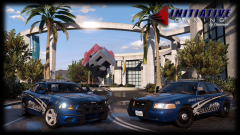 the crown vic has some issues, not sure if your aware of them.
 -
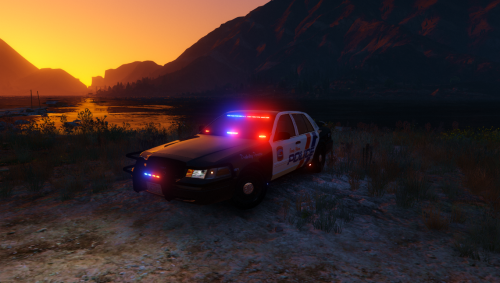 Any possible way to have a update to where this vehicle contains lights in the side windows and not on the lower door panel?....or make the laptop light up for night use?
- 41 comments
- 29 reviews
-
kinda strange...anyone having the issue im having, the vehicle disappears after long distance and you can only see the cop driving and the tires?
- 41 comments
- 29 reviews
-
-
 noticed some more issues while using this model in game, besides the front right tire being pushed out of the right bumper, I noticed that above the right front passenger side door where the top right window meets the door there is a glitch or bug making the door see thru as you can see in the picture below. I also noticed when you use a partner in the vehicle the partner is pushing out of the vehicle, as seen in these pictures below as well.
- 137 comments
- 25 reviews
-
-
or make the long antenna on the roof of the car movable...so when its windy in game the antenna moves like real life!
- 137 comments
- 25 reviews
-
-
Can you please fix the problem with the front right side passenger tire sticking out of the front fender. ...looks like the tire is wider compared to the left one...needs to be pushed in more.... I understand that the older models don't use radar but this is a 2011 model....which they do use radar...Please consider putting radar in vehicle!...thanks.
- 137 comments
- 25 reviews
-
Yes, but if this cvpi pack had radar installed in the vehicle it would make the vehicle way more legit...just add the radar lens and the box on the dash is basically all it needs :) If you need help adding the radar inside the vehicle I can give hand...adding the radar and making the spotlights upright is some what easy....and would make the vehicle look 10x better. As you can see CHP uses radar in there vehicles...in the front and back windows.
- 137 comments
- 25 reviews
-
great model!!! Anyway you can add a radar system inside the vehicle, or make the driver spotlight upright for night use? to make it a little more legit :) I noticed a glitch or bug in this vehicle as well, if you look at the right side(passenger) side you can see that the front tire is sticking out of the front fender, making the wheel look wide...needs to be moved in more. AGAIN...great model!
- 137 comments
- 25 reviews
-
-
 when using the CVPI SAP PACKAGE.....VEHICLE HAS A GLITCH. If you are driving the vehicle and you look at tires you can see right through the tires. PLEASE FIX. Thanks!
- 208 comments
- 59 reviews



