


OfficerELS
Members
-
Joined
-
Last visited
Everything posted by OfficerELS
-
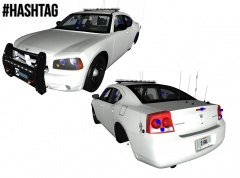 The lighting setup looks good for me , but it has to much antenas
 -
After I delete Advanced Hook Init game works fine
-
Sure send me il check it out
-
Try it , besides idk what is the problem if you dont have double of extra_1 .
-
-
They should put more efort in doing back .
-
Yea put every thing in misc_l and try to export it , but before you put everything in misc_l , save your work as . z3d
-
Best version for Gta IV modeling is : ZModeler 2.2.4 Build 861
-
Put all yours extra's in Misc_l and all other stuff like(glass , interiors etc) in example misc_r and make sure you uncheck all of L1 , just check L0 , L1 loads automatic ingame .
-
Yea , I had this problem with ELS v8 , and I spent 13 hrs to solve the problem , I accidently delete AdvancedHookInit and The game started working normal . so now my game works amaizing no errors , I have played full 4hrs without crashing ( I mean LCPDFR with ELS v8) .
-
Yeah , rear side looks bad but there is no car in world that is perfect . But in front view looks so bad-ass . Maybe Front lights are a little bit too big . But hey who am I to judge it .
-
attach them together, but it takes much more time , besides nobody is even looking at that , my way - simple wayYou need to use original files on ELS v8 (dsound.dll etc.) If it still crashes delete AdvancedHookInit from GTA IV root folder. *Also install these http://www.microsoft.com/en-ca/download/details.aspx?id=5555 http://www.microsoft.com/en-ca/download/details.aspx?id=30679Re-install all and delete the savegames .what do I do ! : I make extra_1_L0 the all others like this : Example: extra_1_L0 extra_1_s_L0 extra_1_g_L0 and so on ....Do you have ELS v8 ? If so delete AdvancedHookInit.dllTry using diffrent ELS patern (Control+M)Did you get any Errors when exporting from ZModeler ? Check "Tutorials" tab and you can watch a tutorial : "Assembling an Entire vehicle" It helps alotIt means that you run out of video memory . That means your graphich is over-used at the moment , Turn down your Graphichs ingame and set to lower screen resolutionTry this : Set game compatibility to Win7 also Run the Game as AdministratorMaybe your Car pack is buged try without carpack , If you have problems with ELS check your veh. models , some models are not compatible with ELSWhat Texure bugs you got ? General or vehicles ?




