


steleb
Members
-
Joined
-
Last visited
Everything posted by steleb
-
you can try it, i havent tested that but i have read somewhere that it breaks the siren for that vehicle. And isnt the buffalo2 and regular buffalo engine sound the same? cuz that's what the police2 is using.
-
no problem, but if you decide to change the audio again make sure you change it to another emergency vehicle or else you will lose the siren
-
I did a little bit of testing for you and i figured it out. new intructions to follow:] Go to: ...\Grand Theft Auto V\mods\update\update.rpf\common\data\levels\gta5 open the vehicles.meta find the sheriff it should look like this: and you need to edit these values (highlighted in red): I also changed the handling to the police2, but that is totally up to you. and the drag and drop your new vehicles.meta file into the directory. Because of all the digging i actually learned something new! Enjoy!
-
It would probably be in the vechicles.meta file, but honestly i could be wrong. at: ...\Grand Theft Auto V\common.rpf\data\levels\gta5 you'll find the original vehicles.meta that came with the game, and if you do "Ctrl + F" and type "sheriff" it'll bring you to the section you are looking for. I have no idea if you can change the audio only from here, but you can change which handling the vehicle uses and other options. This would be a good place to start. if you do find a section that allows you to edit which audio file the vehicle uses copy paste the section for "sheriff" only and paste it in the vehicles.meta file here after the "<InitDatas>" tag: ...\Grand Theft Auto V\mods\update\x64\dlcpacks\mpluxe2\dlc.rpf\common\data\levels\gta5 This is what i would do, but i am no expert.
-
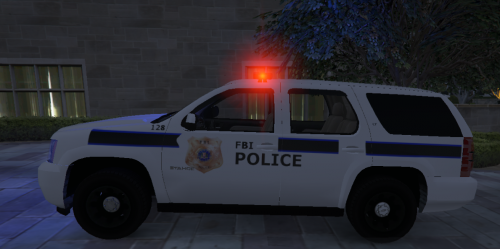 I believe this is what he was going for. Unfortunately this is a scale model, and i believe that this is a fictional "skin" or some other agency that i don't know the name of. even though this might not be a "skin" in real life i give an "A" for effort , great job making a sexy skin
- 11 comments
- 2 reviews
-
-

- 1
-
-
Finalized my LAPD fleet

