


Fowler
Members
-
Joined
-
Last visited
Everything posted by Fowler
-
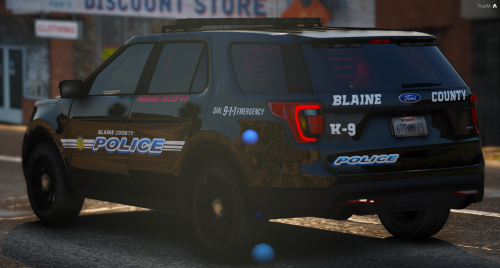 Love the lighting setups. Especially the white led cubes down low, looks awesome! Great work!
- 48 comments
- 16 reviews
Check out the latest as we take to the streets with some snow fall!!!Check out Ohio Mini Series part 2!!!!Check out this ATM robbery!Check out this thrilling episode!!Hey everyone, found a pretty awesome CHP (LSHP) pack. Check it out!Did some Campus PD, check it out and enjoy!!😁Hey everyone, today I took to the streets as RoboCop and it's quite interesting! Enjoy! 😉Account
Navigation
Search
Configure browser push notifications
Chrome (Android)
- Tap the lock icon next to the address bar.
- Tap Permissions → Notifications.
- Adjust your preference.
Chrome (Desktop)
- Click the padlock icon in the address bar.
- Select Site settings.
- Find Notifications and adjust your preference.
Safari (iOS 16.4+)
- Ensure the site is installed via Add to Home Screen.
- Open Settings App → Notifications.
- Find your app name and adjust your preference.
Safari (macOS)
- Go to Safari → Preferences.
- Click the Websites tab.
- Select Notifications in the sidebar.
- Find this website and adjust your preference.
Edge (Android)
- Tap the lock icon next to the address bar.
- Tap Permissions.
- Find Notifications and adjust your preference.
Edge (Desktop)
- Click the padlock icon in the address bar.
- Click Permissions for this site.
- Find Notifications and adjust your preference.
Firefox (Android)
- Go to Settings → Site permissions.
- Tap Notifications.
- Find this site in the list and adjust your preference.
Firefox (Desktop)
- Open Firefox Settings.
- Search for Notifications.
- Find this site in the list and adjust your preference.

