
1Charlie2867
Members
-
Joined
-
Last visited
Files posted by 1Charlie2867
-
THIS SKIN WAS MADE FOR THIS CAR ONLY -
DO NOT RE UPLOAD THIS SKIN TO ANY OTHER WEBSITE
Credit's-
2014 Dodge Charger Model from Real Racing 3, Converted to IV by GeorgieMoon, Converted & Modified for GTA V by Carper and Bxbugs123
- Headlights, Taillights, Interior from Foza, Fitted, Modified, Textured & Converted for GTA V by Bxbugs123
- Chassis L2,s & L3's Modeled, Converted & Textured for GTA V by Bxbugs123
- Inner Rim by GerryStudio, Converted & Textured For GTA V by Bxbugs123
Equitment/lighting
GoRhino 2014 Charger Wraparound by Carper, Textures by Carper
Whelen Dominator - Five0
Whelen PAR 32 - Bxbugs123
Code3 Hide A Blast light - Five0
Whelen ION Spitfire - JKSensation
Whelen liberty by RoegonTV edits by StraightGlitcheZ
Center console from Arma 3 edits by StraightGlitcheZ
Shotgun and M4 - Walters
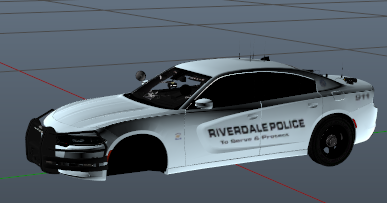
This new Riverdale City Police Skin was added to this vehicle by - 1Charlie2867
- 15 Downloads
Submitted -
THIS IS THE ORIGINAL CAR THE SKIN WAS MADE FOR DO NOT RE-UPLOAD THIS SKIN TO ANY OTHER CAR
Credits:
-2015 Dodge Charger R/T by Turn 10 Studios
-Modifed into 2015 PPV and converted to GTA V by OfficerUnderwood
-Seats by SimRaceway, Radio by OfficerUnderwood
-Wheels by GerryStudio, converted by unknown?
-Whelen Inner Edge by FiveO
-Dashcam by Magictrickzz
-Rambar by Carper
-Code 3 XT6 and Xt3 by MacGregor
-Whelen Dominator by Tomcat8492
-Spotlight by Black Jesus
-Whelen Avenger by TruamaPak
-Radar by Bueno
-Speakers by Hurk
-K9 windows by Gump
-Console by Sheriff Van Dyke
-Laptop by Officer Underwood
-Antenna's by Gump
-Alpr's by Tomcat8492
-Liveries by Getinmybelly0627
-Put together by Gump
-Spotify
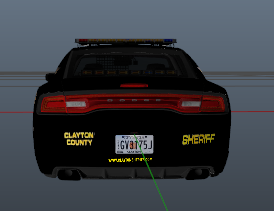
The Riverdale Georgia Skin was added to this vehicle by - 1Charlie2867
- 14 Downloads
Submitted -
This skin was made by me 1Charlie2867 I have got the skin made from a flickr image found on the internet.
If you wish to request a skin be made ( Can be out of state from Georgia) I will make it just please DM me
The car in the photo was not made by me.
- 204 Downloads
- 1 Comments
Updated -
Original Car made from Thehurk.
MODEL OVERVIEW
Skin Made by me - 1Charlie2867
=================================
- NAME: 2015 Dodge Charger
- VERSION: V1.0
- EXTRA PARTS: N/A
- OPTIMIZED FOR: Police2 (can be used in any slot)
!!!!!!!IMPORTANT NOTE!!!!!!!
IF YOU DO NOT READ THE DESCRIPTION/READ ME OF THIS FILE AND YOU AS A QUESTION
THAT I HAVE ALREADY ADRESSED, I WILL NOT RESPOND TO IT.
If you are having issues with "lights being all white", make sure your shader quality ism
turned to very high and your postFX are turned to very high or ultra, and then install radiance V.
Beyond this, I can not help you.
IF YOU WANT TO HAVE THIS VEHICLE IN ANOTHER SLOT, YOU MUST MUST MUST
GO AND INSTALL THE FILE I INCLUDED NAMED: use this to make any vehicle act
like the police2.
If you are content with it relplacing the sheriff2 and youre going to leave it at
that then ignore this section!
INSTILLATION INSTRUCTIONS
=================================
To install this model, all you have to do is just put it in
Mods>Update>x64>dlcpacks>patchday9>dlc.rpf>x64>levels>gta5>vehicles.rpf
To install the CarVariations line, all you have to do is go to:
mods\update\x64\dlcpacks\mpvalentines2\dlc.rpf\common\data
Add what i put in the carvar.txt to the end of your carvariations.
If you dont have patch day 9 in your mods folder, then just copy it from the base files
EXTRAS LIST
=================================
-Extra 1: Rambar with lightstick
-Extra 2: nFORCE Interior Bar
-Extra 3: nFORCE Exterior bar
-Extra 4: Rambar without lights
-Extra 5: Wrap around 1
-Extra 6: Wrap around 2
-Extra 7: Combo of 1&2
-Extra 8: Spotlight
MODEL NOTES
=================================
-This vehicle features 7 extras, the list is seen above.
-It includes a few different setups in the way of lights, slicktop, marked
or minimilsitic.
-It features 2 different rambar with 3 different wraparounds.
-It also features a moving antenna.
-There has been quite a bit of time that's gone into this model, so if there
are any bugs with it, please feel free to message me.
-The skin on this model is simply a placeholder for something to release with.
The model uses the same template as F5544's 15 charger, so it should be compatiable
with every skin released for his charger.
-To remove the ambers from the vehicle, all you have to do is open the .ytd and replace emerglights.png
-I have attempted to make it so that AI vehicles spawn with a lightbar, but its not perfect
-All the files you need for installing the vehicle, reskinning it, etc... are in the
extras folder.
-The instructions for installing this vehicle in another slot are included in the extras
folder.
-Once again i will state the importance of reading EVERYTHING IN THIS FILE before installing
the vehicle.
-BACK UP ALL FILES BEFORE REPLACING WITH MODDED FILES, I CAN NOT STATE THIS ENOUGH
-Enjoy!
CREDITS
=================================
Base Model
-Model is original 2015 Dodge Charger from Forza Horizon 2 (F&F DLC), modified to PPV version and converted to GTAIV by IronicRainbow.
-Converted into a AWD Police vehicle by IronicRainbow.
-Polygon filling by TheHurk
-converted to and modified for GTA V by F5544
-Major bugfixing by F5544
Lighting Equipment
-Soundoff Nforce Exterior bar by thehurk
-Soundoff Nforce Interior bar by thehurk
-Soundoff Nforce Rear deck bar by thehurk
-Soundoff Nforce Lightstick by thehurk
-Whelen Ions by deco
Misc Equipment
-Setina Partition by Rebootaburg
-Setina Gun Rack by GTAxB0SS
-Console by SheriffVanDyck
-Toughbook by Ridgerunner
-Generic Radar by Bueno
-Spotlight by EVI
-Antenna by Hump
-Medbag by Vertex3d
-Rambar & wrap 1 by Jasonct203
-Wrapround 2 by Hump
-Dodge Steel Rims Model by GerryStudio
-Mapped and Converted to GTA V by MattJeter
All converted to V by Thehurk with proper permissions
If i have forgotten any Credits please PM me!
Disclaimer
=================================
-You are not to attempt to modify or rip this model in any way shape or form.
-I (Thehurk) am not resposible for any damages done to your game. Please make a backup of any edited files!
-Do not attempt to make a profit off this model in any way shapr or form.
-Do not re-upload this file to any other site.
-Do not claim this model as your own.
-If you want to use this file in a clan, PLEASE ask me before doing so.
- 1,698 Downloads
- 2 Comments
Updated -
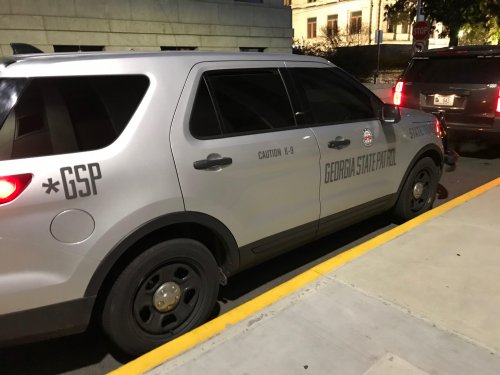
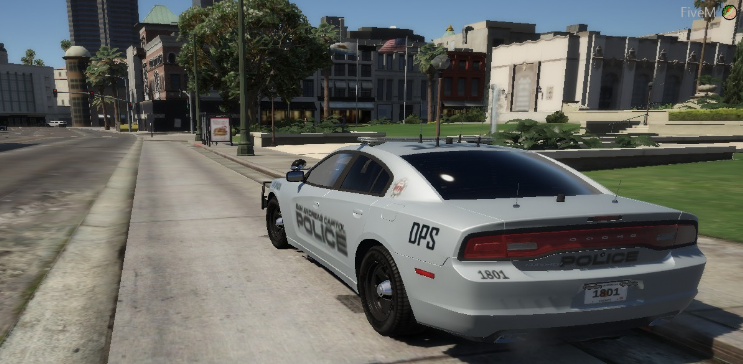
After going with my mom to work and building a friendship with Several Georgia State Trooper's and Capital Police Officer's of the state capital hill I have permission to take pictures of the patrol car's so after today this inspired me to make this lovely vehicle.
- 169 Downloads
Submitted -
This does not include the car and or the uniform just the skin if any question please ask new cars coming soon.
- 18 Downloads
- 1 Comments
Submitted