DiegoBoricua
Members
-
Joined
-
Last visited
Files posted by DiegoBoricua
-
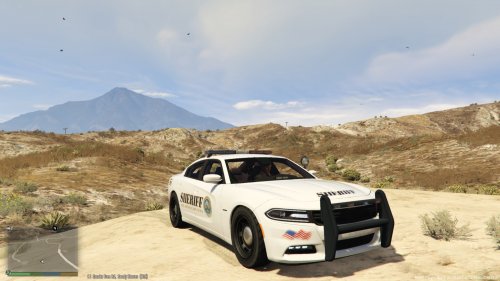
This is a custom skin representing the Blaine County Sheriff department.
I'm no expert at making vehicle textures, but I hope you enjoy.
Please let me know what you think in the comments and leave a rating.
Instructions: Use OpenIV and go to the directory where the model is located. Make sure you're in edit mode. Open the texture files and find policenew_sign_1. Now replace the texture.
Charger model: http://www.lcpdfr.com/files/file/8466-2015-dodge-charger-rt-police/
- 203 Downloads
Submitted -
This is my (DiegoBoricua) first livery I have uploaded. I hope everyone enjoys it!
This livery was created on the model uploaded by Cj24 in this vehicle pack:
I am planning on doing liveries, similar to the one being uploaded, based on the vehicles in that car pack.
The program that I used to create the livery was Adobe Photoshop CC (cs7).
Please leave your feedback so I can know what to change and make it better, also so I know if I should continue with the other vehicles.
- 80 Downloads
- 13 Comments
Updated