Exo 401
Members
-
Joined
-
Last visited
Files posted by Exo 401
-
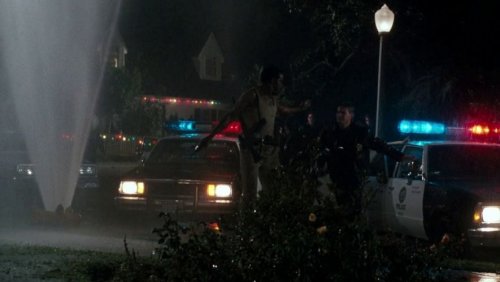
Took random tones from here: http://stockmusic.com/sound_effects/alarms_bells__sirens/sirens?snd_id=246788 and made a siren that sounds like your typical police sirens in those 80's action films. Demo below.
People have been asking me for the car model.. Here it is:
Take a look at 11john11 cars and Lundy's cars if you want nice retro vehicles!
To achieve same visual settings, I have Visual 1.0.330 https://www.gta5-mods.com/misc/visualv and then I installed LED Spotlight and Corona Version 9.1.0 https://www.gta5-mods.com/misc/improved-spotlight-and-led-lighting
- 4,007 Downloads
- 17 Comments
Updated -
I present to you the Rhode Island State Police Pack for vanilla models. You can find the car models used here on lcpdfr.
Textures are for the following: Stanier, Buffalo, Fugitive, Granger and Lundy's police motorcycle. Regular texture and K-9 texture included but not for all vehicles. If you want to use the hat, you'll need to replace the SAHP helmet with the park ranger's. Instructions are in the pedprops folder. However if you do this the helmet will be replaced with the hat and you will no longer have the helmet. I don't know how to have multiple hat's for the pedprops. If anyone knows how please let me know!
- 167 Downloads
- 7 Comments
Submitted -
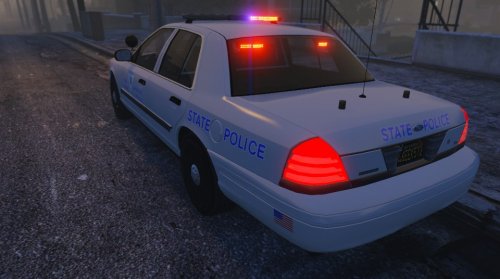
A Rhode Island State Police (San Andreas State Police) based livery for the 2011 CVPI Alpha 0.1. I cannot find a high quality RISP seal so I made one myself, it sucks at the moment. Might fix it up. Any suggestions or corrections please feel free to comment so I can try to fix. I changed the laptop screen to something better and not as bright as the one that came with the model and make all lights red. Due to limitations, blue corona will still flash, but that's OK because some vehicles do have blue lights! Nothing I can do about the rims, this is just a texture.
Light Mod Using - ELS Style Police LightsGlass Textures By Kpdofficer (It appears to be deleted)
VisualV Mod - https://www.gta5-mods.com/misc/visualv
Link to model - Removed at request of the model creator
- 43 Downloads
- 3 Comments
Updated -
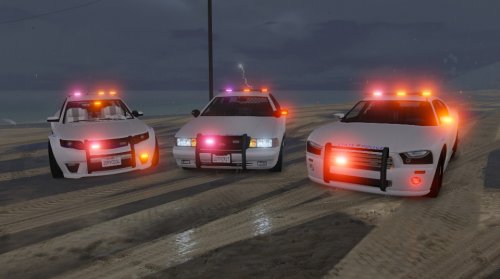
Rhode Island State Police (San Andreas State Police) based liveries. All lights are red,and due to limitations, blue corona will still flash, but that's OK because some vehicles do have blue lights and it looks pretty cool.
The models in the pics are below:
Cheval Fugitive Model - http://www.lcpdfr.com/files/file/8657-standalone-cheval-fugitive-ppv-pack/
Bravado Buffalo - http://www.lcpdfr.com/files/file/8632-bravado-buffalo-1st-gen-mapped-sahp-style/
Vapid Stanier - http://www.lcpdfr.com/files/file/8456-vapid-stanier-mapped-sahp-style/
** May make K-9 variation and Rhode Island State Police **
- 41 Downloads
Updated -
Since ped modeling isn't possible right now and none of the cops wear shorts, I decided to edit Michael's clothes to make him part of LAPD's Bicycle Coordination Unit. I recommend using a trainer for this to get the correct textures.
These instructions are for Simple Trainer by Sjaak:
After activating LSPDFR - Switch back to Michael Go to Clothes Menu Upper Slot > Model 17 > Texture 1 Lower Slot > Model 14 > Texture 4 Shoes Slot > 2 Accessory 1 Slot > 9 (Gruppe 6 utility belt) Hats Slot > 8 Installation Instructions
I highly recommend using the mods folder or at least make back ups!
If you have a mods folder already set up do this:
Copy x64v.rpf to your mods folder In OpenIV go to Grand Theft Auto V\mods\x64v.rpf\models\cdimages\streamedpeds_players.rpf\player_zero and replace these files: accs_diff_008_a_uni.ytd
lowr_diff_013_d_whi.ytd
uppr_diff_016_a_whi.ytd
Next go to Grand Theft Auto V\mods\x64v.rpf\models\cdimages\streamedpedprops.rpf\player_zero_p and replace this file: p_head_diff_007_a.ytd
If you do not have a mods folder do this:
In OpenIV go to Grand Theft Auto V\x64v.rpf\models\cdimages\streamedpeds_players.rpf\player_zero and replace the files like above Go to Grand Theft Auto V\x64v.rpf\models\cdimages\streamedpedprops.rpf\player_zero_p and replace the file like above And that's it! Have fun bicycle patrolling at the beaches!
Just wanted to point out that when you use Michael while playing LSPDFR, random events will happen such as purse snatcher, bike thefts and more.
- 563 Downloads
- 15 Comments
Updated -
Here is a retexture of the GTA V LSPD officer to LAPD. Also comes with darkened spec's to get rid of the gloss.
- 543 Downloads
- 15 Comments
Submitted -
I never really liked the sound of the male dispatcher. He sounds dull and boring. I got a hold of a TTS program and used a natural sounding female voice. Each speech from the LCPDFR/Audio folder has been replaced! I also include the audio from Wouters Callout and Callouts+.
Note: This does not replace any game default game files. If you are using other scripts that such as Abraxas' VDH Police Helper, it uses the in-game male dispatch voice, not the audio files in the LCPDFR/Audio file, so you will hear the male dispatch when calling for ambulance and such.
If anyone wants to help me how to use police codes instead of words, I'll make another version. All police departments have their own codes so I don't know which ones to use and I'm not sure how they say them over the radio. So if someone can maybe tell me how to use them, then I could make another version using less words and with police codes.
http://youtu.be/ZlMaj2geKsk
- 5,771 Downloads
- 34 Comments
Submitted -
Hi guys I spent all day editing the main cop textures. I didn't like how low res and blurry they looked, so I did a little editing to make them look much better.
Changes from the original:
1) Higher texture resolution
2) New button texure
3) New cloth texture
4) New badge + matching hat badge
5) Two citation bars
6) New arm patch
7) New collar insignia
8) Nameplate
9) New tie lapel
10) Added the noose gloves texture
The file is pretty large, about 6 MB and because of that, the game will only load the fat cop model. So what you have to do is go to Grand Theft Auto IVGTAIVcommondata , find Pedgroup and open it. Ptress Ctrl + F and type Cop.
Change it to this:
# POPCYCLE_GROUP_COPS (M_Y_Cop_Traffic removed. Was the one in NJ)
M_Y_Cop, M_Y_COP
M_M_FAT_COP
+ Changed the glove texture.
- 698 Downloads
- 13 Comments
Updated -
This is the Rhode Island Trooper uniform. For anyone whoever wanted it, here ya go! The stripes near the cuff's are don't line up on the back side, because of the wrinkles. Two color choice for hat.
Peace :thumbsup:
- 235 Downloads
- 9 Comments
Submitted -
This is the Connecticut State Trooper uniform. For anyone whoever wanted it, here ya go! I switched meshes from Cop's Upper and Pilot's Upper and replaced the ones in the Strooper model.
There seems to be a bug and I have no idea how to fix it. This ped will not show up in the game anymore. The only way you can see it is with a trainer. If anyone has any idea why it does this, can you please let me know how to fix it?
Also there seems to be a problem with alignment with the jacket as you can see in pic 5.
Peace :thumbsup:
- 671 Downloads
- 5 Comments
Submitted