




Day at the beach with logo.png

By Crizby
- 550 views
- View Crizby's images
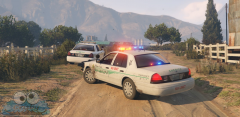
The mainstream beach photograph.
I have to start somewhere now that I haved moved on to GTA V! I'm going to miss IV very much, however the game would no longer work with my new computer so I had to move on. Although it felt a bit sad, I have to say that the looks in GTA V is amazing. I only wished the AI would behave more like in IV, same with the vehicle physcics.
Anyhow... I made a small test livery pack based off San Diego Police for a range of vehicles. Shoutout to the YouTube tutorials teaching me how to mod GTA V and hopefully I can release something in the future for V.
Recommended Comments
Join the conversation
You can post now and register later. If you have an account, sign in now to post with your account.