

Skip to content
View in the app

A better way to browse. Learn more.

LCPDFR.com

A full-screen app on your home screen with push notifications, badges and more.

To install this app on iOS and iPadOS
  1. Tap the Share icon in Safari
  2. Scroll the menu and tap Add to Home Screen.
  3. Tap Add in the top-right corner.
To install this app on Android
  1. Tap the 3-dot menu (⋮) in the top-right corner of the browser.
  2. Tap Add to Home screen or Install app.
  3. Confirm by tapping Install.

Sheriff

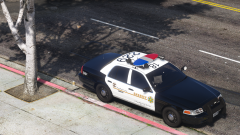
So against my better judgement I have shifted from the East Coast grind to LASD... but LSSD so all you Californians dont cry again. Man I hate California but this is a nice department anyway have fun gtg.


Livery parts by Belly, put together by me and then the city things by me.

Credit

t0y, getinmybelly, iansonwheels, Carper, Five0, Matt, BxBugs

Copyright

© t0y, getinmybelly

From the album:

West Coast

· 2 images

Account

Navigation

Search

Search

Configure browser push notifications

Chrome (Android)
  1. Tap the lock icon next to the address bar.
  2. Tap Permissions → Notifications.
  3. Adjust your preference.
Chrome (Desktop)
  1. Click the padlock icon in the address bar.
  2. Select Site settings.
  3. Find Notifications and adjust your preference.