




Behind Bars...

By CG Blaze
- 1,074 views
- View CG Blaze's images
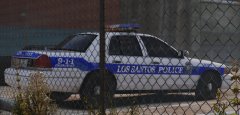
"Was taking a walk around southeast LS today, when something caught my eye in the police impound lot. I decided to deviate from my normal route to get a better look...
And there she was: an old '98 Vic, still with it's old rotator lightbar intact. She was quite a looker, and I bet if cars could talk she'd have some interesting stories to tell. But gone were her glory days of chasing perps and basking in the smell of fresh donuts in the morning. No, no... This old gal had been sentenced to run out the rest of her life behind a chain link fence, watching as the city grows and as time moves on without her.
Sure, the Vic has seen its time, and I'm sure our local officers are enjoying the creature comforts and fuel efficiency the old Fords simply never had. But to me, there's just somethin' about the old Vic's that the new Chargers and Tahoes the city bought just don't have: character."
-u_m_y_militarybum


Recommended Comments
Join the conversation
You can post now and register later. If you have an account, sign in now to post with your account.