Skip to content
View in the app

A better way to browse. Learn more.

LCPDFR.com

A full-screen app on your home screen with push notifications, badges and more.

To install this app on iOS and iPadOS
  1. Tap the Share icon in Safari
  2. Scroll the menu and tap Add to Home Screen.
  3. Tap Add in the top-right corner.
To install this app on Android
  1. Tap the 3-dot menu (⋮) in the top-right corner of the browser.
  2. Tap Add to Home screen or Install app.
  3. Confirm by tapping Install.

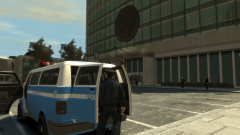
Greater Liberty Police Motorway Response Unit (WIP)

Look at me, just look at me, I can screenshot now. With thanks to @tedious for providing me with a screenshot tool, but no thanks to TakeTwo for making me have to find alternate methods.


So here's a hint for the future. The GLP motorway car. It goes vroom vroom and whoop whoop, what else is there to say? Stay tuned for more zoomers.

Copyright

© Hullian111
  • From the album:

    Hullian111's Gratuitous Misadventures

    · 66 images

    Account

    Navigation

    Search

    Search

    Configure browser push notifications

    Chrome (Android)
    1. Tap the lock icon next to the address bar.
    2. Tap Permissions → Notifications.
    3. Adjust your preference.
    Chrome (Desktop)
    1. Click the padlock icon in the address bar.
    2. Select Site settings.
    3. Find Notifications and adjust your preference.