Skip to content
View in the app

A better way to browse. Learn more.

LCPDFR.com

A full-screen app on your home screen with push notifications, badges and more.

To install this app on iOS and iPadOS
  1. Tap the Share icon in Safari
  2. Scroll the menu and tap Add to Home Screen.
  3. Tap Add in the top-right corner.
To install this app on Android
  1. Tap the 3-dot menu (⋮) in the top-right corner of the browser.
  2. Tap Add to Home screen or Install app.
  3. Confirm by tapping Install.

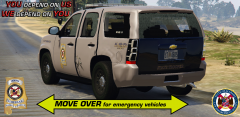
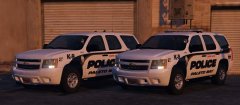
Move over for emergency vehicles

In Alabama the law reads drivers approaching stationary emergency vehicles that are displaying flashing lights, including wreckers, traveling in the same direction, to vacate the lane closest if safe and possible to do so, or to slow to at least 15mph less than the posted speed limit. 

Please be safe on the road. Unfortunately, a lot of people are not aware of this law and I see people not getting over when available.


From the album:

Tahoes

· 65 images

Account

Navigation

Search

Search

Configure browser push notifications

Chrome (Android)
  1. Tap the lock icon next to the address bar.
  2. Tap Permissions → Notifications.
  3. Adjust your preference.
Chrome (Desktop)
  1. Click the padlock icon in the address bar.
  2. Select Site settings.
  3. Find Notifications and adjust your preference.