
Skip to content
View in the app

A better way to browse. Learn more.

LCPDFR.com

A full-screen app on your home screen with push notifications, badges and more.

To install this app on iOS and iPadOS
  1. Tap the Share icon in Safari
  2. Scroll the menu and tap Add to Home Screen.
  3. Tap Add in the top-right corner.
To install this app on Android
  1. Tap the 3-dot menu (⋮) in the top-right corner of the browser.
  2. Tap Add to Home screen or Install app.
  3. Confirm by tapping Install.

Boot

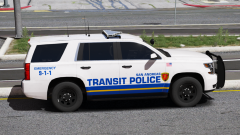
Inspired by Prairie Village, KS.


Spoiler

FPYvxB5.png


BVzMhv0.png


Tips: Worn out tire textures, dark (but not black) steel rims and rim/center cap reflections are crucial for making a model look realistic. Here, the Tahoe's steel rims were recolored to look like SSV rims, and this looks better because the rims do not have reflections.

Credit

Skins by iansonwheels, Tahoe by thegreathah, CVPI WIP by jumperman09

From the album:

Ian's GTA V Screenshots

· 65 images

Account

Navigation

Search

Search

Configure browser push notifications

Chrome (Android)
  1. Tap the lock icon next to the address bar.
  2. Tap Permissions → Notifications.
  3. Adjust your preference.
Chrome (Desktop)
  1. Click the padlock icon in the address bar.
  2. Select Site settings.
  3. Find Notifications and adjust your preference.