Skip to content
View in the app

A better way to browse. Learn more.

LCPDFR.com

A full-screen app on your home screen with push notifications, badges and more.

To install this app on iOS and iPadOS
  1. Tap the Share icon in Safari
  2. Scroll the menu and tap Add to Home Screen.
  3. Tap Add in the top-right corner.
To install this app on Android
  1. Tap the 3-dot menu (⋮) in the top-right corner of the browser.
  2. Tap Add to Home screen or Install app.
  3. Confirm by tapping Install.

Armed suspect

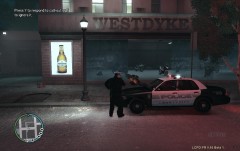
Officer Kjel0112 of the LCPD pulled over a vehicle that was not roadworthy. Upon reaching the driver door, the suspect got out of the car, pulled a gun out of his pocket and started aiming at the officer. The officer shot him twice in the chest as a measure of self defense. Paramedics arrived later at the scene and declared the suspect to be deceased. A police investigation has been started to investigate the incident.

  • From the album:

    kjel0112 pictures

    · 50 images

    Account

    Navigation

    Search

    Search

    Configure browser push notifications

    Chrome (Android)
    1. Tap the lock icon next to the address bar.
    2. Tap Permissions → Notifications.
    3. Adjust your preference.
    Chrome (Desktop)
    1. Click the padlock icon in the address bar.
    2. Select Site settings.
    3. Find Notifications and adjust your preference.