Skip to content
View in the app

A better way to browse. Learn more.

LCPDFR.com

A full-screen app on your home screen with push notifications, badges and more.

To install this app on iOS and iPadOS
  1. Tap the Share icon in Safari
  2. Scroll the menu and tap Add to Home Screen.
  3. Tap Add in the top-right corner.
To install this app on Android
  1. Tap the 3-dot menu (⋮) in the top-right corner of the browser.
  2. Tap Add to Home screen or Install app.
  3. Confirm by tapping Install.

Wrapping this mess I made up

V1.7 of this hell will be out Wednesday and it may be the last one and then I'm moving on.

V1.7 Includes

Two more Impala's(Bug's Model marked & unmarked)

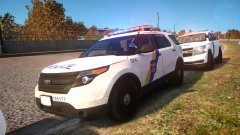
Two Explorer's(Legacy & Unmarked)

Three 2013 Chevrolet Tahoe (Unmarked)

Every Marked Unit with the LibertySX(Not LibertyII) will have an accurate lightbar setup

20160718210512_1.jpg

20160717172355_1.jpg

20160718204737_1.jpg

20160718210504_1.jpg

  • Account

    Navigation

    Search

    Search

    Configure browser push notifications

    Chrome (Android)
    1. Tap the lock icon next to the address bar.
    2. Tap Permissions → Notifications.
    3. Adjust your preference.
    Chrome (Desktop)
    1. Click the padlock icon in the address bar.
    2. Select Site settings.
    3. Find Notifications and adjust your preference.