Skip to content
View in the app

A better way to browse. Learn more.

LCPDFR.com

A full-screen app on your home screen with push notifications, badges and more.

To install this app on iOS and iPadOS
  1. Tap the Share icon in Safari
  2. Scroll the menu and tap Add to Home Screen.
  3. Tap Add in the top-right corner.
To install this app on Android
  1. Tap the 3-dot menu (⋮) in the top-right corner of the browser.
  2. Tap Add to Home screen or Install app.
  3. Confirm by tapping Install.

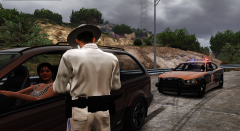
the BCSD just bought some needlessly large trucks

Blaine County Post

Today, the BCSD received a shipment of 40 Chevrolet SIlveradoes. They are huge, perfect for carrying... whatever they would need a truck to carry, we guess. Anyway, this cost the taxpayer a lot, probably. They also received a shipment of chargers, which are good for chasing down the various souped-up cars that love to race our highways. So uh, good job, BCSD.

  • From the album:

    SiCK PUPPY'S GTA SHiT

    · 15 images

    Account

    Navigation

    Search

    Search

    Configure browser push notifications

    Chrome (Android)
    1. Tap the lock icon next to the address bar.
    2. Tap Permissions → Notifications.
    3. Adjust your preference.
    Chrome (Desktop)
    1. Click the padlock icon in the address bar.
    2. Select Site settings.
    3. Find Notifications and adjust your preference.