


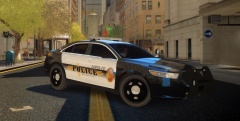


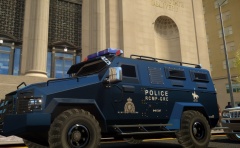

RCMP IRSU skin update

By Lazerus
- 1,274 views
- View Lazerus's images
so did a few updates, for the most part I think she's all done now, just have to transfer some of the changes to the normal patrol unit skin.
- fix the sizing on the vehicle unit number on the back bumper, needed to be a bit bigger.
- fix the crime stoppers decal
- added reflective (tape???) to the sides of the vehicle, actually makes it look very sharp now.
- adjusted the sizing for the IRSU text on the side of the unit skin to be a tad bigger, moved the Canadian gov decal (to where the Nanaimo unit's have it)
thoughts? Also I know this keeps coming up, about the plates, reason I keep them is due to... its liberty city. So I keep the plates I've made for liberty city on it, though I might make some BC plates for it.
Recommended Comments
Join the conversation
You can post now and register later. If you have an account, sign in now to post with your account.