Skip to content
View in the app

A better way to browse. Learn more.

LCPDFR.com

A full-screen app on your home screen with push notifications, badges and more.

To install this app on iOS and iPadOS
  1. Tap the Share icon in Safari
  2. Scroll the menu and tap Add to Home Screen.
  3. Tap Add in the top-right corner.
To install this app on Android
  1. Tap the 3-dot menu (⋮) in the top-right corner of the browser.
  2. Tap Add to Home screen or Install app.
  3. Confirm by tapping Install.

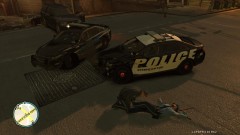
Officer Down

In the aftermath of the accident one officer was thrown from his vehicle. CPR was administered until paramedics arrived. The two officers in the other vehicle were not injured, and treated on-scene for minor injuries. Both patrol cars, including the newest addition to the fleet- the interceptor, were totaled in the accident. Reconstruction crews were setting up to investigate the cause of the accident.

Copyright

© Copyright Visible25 Produtions 2011-2012
  • From the album:

    Traffic Accident

    · 2 images

    Account

    Navigation

    Search

    Search

    Configure browser push notifications

    Chrome (Android)
    1. Tap the lock icon next to the address bar.
    2. Tap Permissions → Notifications.
    3. Adjust your preference.
    Chrome (Desktop)
    1. Click the padlock icon in the address bar.
    2. Select Site settings.
    3. Find Notifications and adjust your preference.