





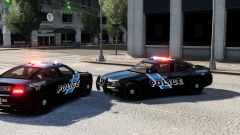




Sandy Springs, GA Police 2008 Charger Skin

By sixium
- 2,299 views
- View sixium's images
Another police design that interested me (because of the door stripe!), so I decided to create a skin for it, Sandy Springs Police 2008 Charger. I know other Sandy Springs skins are out there, don't want to encroach on others so I'm probably not going to release this. Just for my own use. What do you think? I tried to be as accurate as possible, but the unit number on the front bumper is too far forward (limitation of the template), and I couldn't find the seal that they used on the C-pillar, so I just used a State of Georgia seal instead.
Model by Cj24.
Recommended Comments
Join the conversation
You can post now and register later. If you have an account, sign in now to post with your account.