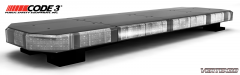
Code 3 Defender LED Lightbar Share https://www.lcpdfr.com/gallery/image/37602-code-3-defender-led-lightbar/ Share on Facebook Share on X {lang="reddit_text" More sharing options... Followers 3D Creation of: Code 3 Defender LED Lightbar All rights go to Code 3 Inc. for the original design, all credits go to me for the 3D creation. Let me know what you think!
Deactivated Member Deactivated August 3, 201411 yr Author stats Nice. I Must Say It's Just Perfection!!!
XBR410 Members August 3, 201411 yr Author stats the mount placement looks too far in (not as important) but the light bar looks a little bit too tall Reference Picture Could Just be the Picture, but it just looks Too tall and a bit off Hopefully this helps if you plan on making it Better Also for the Modules you should watch this video http://cdnapi.kaltura.com/index.php/extwidget/openGraph/wid/1_0d2ihbfq You will see that your Module's are Incorrect other than that everything looks accurate love the shell and glass
Deactivated Member Deactivated August 4, 201411 yr Author stats wooooooooaaaaaaaaaaaaaaaaaaaaaaahhhhhhhhhhhhhhhhhhhhhhhh :D






Recommended Comments
Join the conversation
You can post now and register later. If you have an account, sign in now to post with your account.