





Whelen Vertex Hideaway

By Mustu
- 1,487 views
- View Mustu's images
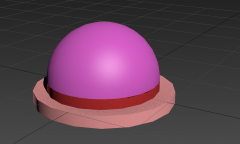
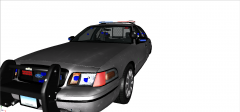
My WIP Whelen Vertex Hideaway Super LED for GTA IV. I don't know if I want to release this unlocked, or whether it should be private. I may release it unlocked, because I find that Corleone's is kind of hard to use, especially since (for me anyway) the ELS seems to be a bit weird. Let me know if you want them released in the comments section.
I'm totally aware it's super inaccurate right now, but it's definitely coming together. I aimed for it to be low poly as well, so if I were to make it super accurate and perfectionist-like, it'd up the polys. Also, this is my first attempt at 3Ds Max scratch modeling, and I'm totally aware this is easy to do, but I thought of the Vertex because it was simple, effective, and super nice looking when used properly. I'm definitely getting the hang of 3Ds Max now.
Recommended Comments
Join the conversation
You can post now and register later. If you have an account, sign in now to post with your account.