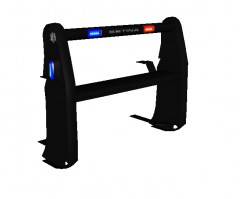
Setina PB-5 with Fender Wrap Share https://www.lcpdfr.com/gallery/image/24159-setina-pb-5-with-fender-wrap/ Share on Facebook Share on X {lang="reddit_text" More sharing options... Followers Main pushbar scratch made by evanscornelius. Fender Wrap scratch made by trewq34. Modified and converted by trewq34. ***Just realised the Setina logo is the wrong one, since this is a CVPI rambar. The problem has been fixed on the model.*** Copyright © Mike Oscar Modding
trewq34 Members November 23, 201312 yr Author stats great. will it be released unlocked ? Unfortunately it won't




Recommended Comments
Join the conversation
You can post now and register later. If you have an account, sign in now to post with your account.