
Skip to content
View in the app

A better way to browse. Learn more.

LCPDFR.com

A full-screen app on your home screen with push notifications, badges and more.

To install this app on iOS and iPadOS
  1. Tap the Share icon in Safari
  2. Scroll the menu and tap Add to Home Screen.
  3. Tap Add in the top-right corner.
To install this app on Android
  1. Tap the 3-dot menu (⋮) in the top-right corner of the browser.
  2. Tap Add to Home screen or Install app.
  3. Confirm by tapping Install.

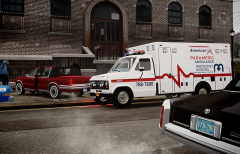
Moar NYC EMS...

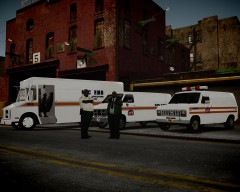
- Well, showcased in the above picture, a generic NYC EMS Chevrolet Step Van, a Borough Supply Unit GMC Vandura van and a Ford Econoline.

- Below. Close view of the NYC EMS Econoline van. A pretty rare unit I'd say. I accidentaly found one in a video of Times Square in the 1980s; so far I had just seen GM vans...

o3yp.jpg

41a8.jpg

Above. Staten Island University Hospital Econoline Ambulance (old paint job).

PS. For those who asked me about the NYC EMS peds, I'm sending you soon;)

  • From the album:

    Strike's

    · 221 images

    Account

    Navigation

    Search

    Search

    Configure browser push notifications

    Chrome (Android)
    1. Tap the lock icon next to the address bar.
    2. Tap Permissions → Notifications.
    3. Adjust your preference.
    Chrome (Desktop)
    1. Click the padlock icon in the address bar.
    2. Select Site settings.
    3. Find Notifications and adjust your preference.