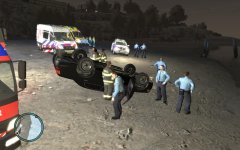
Traffic accident on Leftwood Beach. Share https://www.lcpdfr.com/gallery/image/2262-traffic-accident-on-leftwood-beach/ Share on Facebook Share on X {lang="reddit_text" More sharing options... Followers At 21.47 a persumable drunk driver drove onto the beach, he somehow managed to flip the car. When the first unit arrived, the man had already fleed the scene. Unit on scene: - Ambulance 17-146 - Engines CE 52-1 & CE 52-2 - VOA (traffic accident analystics) 24-3554 - Patrol vehicle 6 & 7
Custo Members February 13, 201214 yr Author stats What's with all the god damn traffic cops, and no hats?
KoCh Members February 13, 201214 yr Author stats What's with all the god damn traffic cops, and no hats? They're there for technical research, and you can set them to have hats with SNT, but you have to do it manual for each.




Recommended Comments
Join the conversation
You can post now and register later. If you have an account, sign in now to post with your account.