


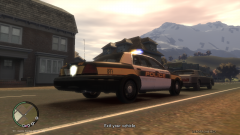


Cars need gas

By JSDGraphics
- 592 views
- View JSDGraphics's images
Going about patrolling the streets of suburban Alderney when all of a sudden I see my fuel is at empty. The nearest gas station is about 2.5 miles away. I floor it going code 3 to the station when my car dies going down a slight hill. Just when I think I have enough leverage to make it to the pumps my car coasts to a stop just yards away from the pumps. I guess it's a good thing though because that truck behind the car fueling up is about to rear end the car, sending the car rolling into the pump, causing a massive explosion right before my eyes. If I had of made it to the station my partner and I could have been killed... Weird... or.. what? True story too.
Recommended Comments
Join the conversation
You can post now and register later. If you have an account, sign in now to post with your account.