Jump to content
View in the app

A better way to browse. Learn more.

LCPDFR.com

A full-screen app on your home screen with push notifications, badges and more.

To install this app on iOS and iPadOS
  1. Tap the Share icon in Safari
  2. Scroll the menu and tap Add to Home Screen.
  3. Tap Add in the top-right corner.
To install this app on Android
  1. Tap the 3-dot menu (⋮) in the top-right corner of the browser.
  2. Tap Add to Home screen or Install app.
  3. Confirm by tapping Install.

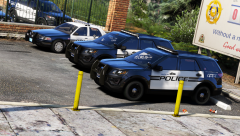
GSPD6.png

Credit

I'm not a tremendous skin developer - in fact, I don't do skins at all. But using Bxbugg's Tahoe skins as a learning method, I'm going to be ensuring that these old-style crown victorias have dated and unkempt appearances. These skins are derivative of that author's work presently as a result. The final product will not have any elements of their original work, as these are merely meant to be studies.

From the album:

Project: Boston, Massachusetts

· 470 images

Account

Navigation

Search

Configure browser push notifications

Chrome (Android)
  1. Tap the lock icon next to the address bar.
  2. Tap Permissions → Notifications.
  3. Adjust your preference.
Chrome (Desktop)
  1. Click the padlock icon in the address bar.
  2. Select Site settings.
  3. Find Notifications and adjust your preference.