


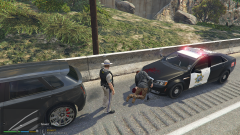
Perp shot himself. Not even kidding.

By danksg
- 226 views
- View danksg's images
So, I'm on my usual highway patrol when I pull over this guy for speeding. I bring him to the front of my Caprice for a pat down and to cuff him. Just before I pat him down, he pulls a pistol on me. I quickly melee him (I have Realistic Melee installed so in general the one punch kills don't happen anymore), he falls over the bonnet of my cruiser and as he falls, his hand holding the pistol somehow turns inwards to his body and fires as he hits my bonnet. That's how the blood got on my cruiser and that's his pistol on the ground. I never even unholstered my weapon, let alone fired it. Yet, here's a perp who was shot to death. I thought it was hilarious and I just wanted to share it with someone. Hope you found it as funny as I did, hah!
Recommended Comments
Join the conversation
You can post now and register later. If you have an account, sign in now to post with your account.