



Skip to content
View in the app

A better way to browse. Learn more.

LCPDFR.com

A full-screen app on your home screen with push notifications, badges and more.

To install this app on iOS and iPadOS
  1. Tap the Share icon in Safari
  2. Scroll the menu and tap Add to Home Screen.
  3. Tap Add in the top-right corner.
To install this app on Android
  1. Tap the 3-dot menu (⋮) in the top-right corner of the browser.
  2. Tap Add to Home screen or Install app.
  3. Confirm by tapping Install.

Sweet Caroline... BUH BUH BUH

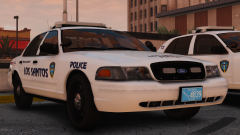
Here is a CVPI, idk what else I'm supposed to say. I'm really hungry atm and no one is home so I probably need to get take out but idk where to order from, so annoyed. I do have gummy bears though, maybe I'll eat those. I'll keep you guys posted on that one.


Screenshot_3.png

Credit

t0y, Iansonwheels, Chappie, KevinDV, Carper, Matt, OfficerUnderwood, HDGamerzPC

Copyright

© t0y, Chappie

From the album:

t0y's Projects

· 127 images

Account

Navigation

Search

Search

Configure browser push notifications

Chrome (Android)
  1. Tap the lock icon next to the address bar.
  2. Tap Permissions → Notifications.
  3. Adjust your preference.
Chrome (Desktop)
  1. Click the padlock icon in the address bar.
  2. Select Site settings.
  3. Find Notifications and adjust your preference.