Skip to content
View in the app

A better way to browse. Learn more.

LCPDFR.com

A full-screen app on your home screen with push notifications, badges and more.

To install this app on iOS and iPadOS
  1. Tap the Share icon in Safari
  2. Scroll the menu and tap Add to Home Screen.
  3. Tap Add in the top-right corner.
To install this app on Android
  1. Tap the 3-dot menu (โ‹ฎ) in the top-right corner of the browser.
  2. Tap Add to Home screen or Install app.
  3. Confirm by tapping Install.
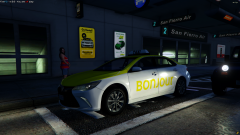
WIP Laval/Montreal - Quebec/Canada

WIP Laval/Montreal - Quebec/Canada

Album created by Pascal BigWave Parent ยท Updated

Should I be releasing this? I started a FiveM server with all those assets on. PM me for more details ๐Ÿ™‚ Si vous voulez tester tous ces vehicules, msg moi ๐Ÿ™‚

SG9Qc

Members

c'est tu une esti de question ca ๐Ÿ˜› hahahaha BIN OUI ... voyons sort moรฉ ca au plus sacrant c'est tellement magnifique que tu serais pas mal egoiste de pas en faire profiter au pauvre ignare comme nous hehehehe!

1 hour ago, SG9Qc said:

c'est tu une esti de question ca ๐Ÿ˜› hahahaha BIN OUI ... voyons sort moรฉ ca au plus sacrant c'est tellement magnifique que tu serais pas mal egoiste de pas en faire profiter au pauvre ignare comme nous hehehehe!

ย 

ย 

๐Ÿคฃ๐Ÿคฃ will do, suyivez moi et ca s en vient

carthagien

Members

Bonjour! Quand que se pack serra disponible au tรฉlรฉchargement? Parce qu'il est vraiment beau! ๐Ÿ™‚

ย 

kronyx

Members

Je pense que c'est mort, il a postรฉ ca vla 1 an et demi

ย 

Loukabd2005

Members

hey this is awesome how do i download?

Join the conversation

You can post now and register later. If you have an account, sign in now to post with your account.

Guest
Add a comment...

Recently Browsing 0

  • No registered users viewing this page.

Account

Navigation

Search

Search

Configure browser push notifications

Chrome (Android)
  1. Tap the lock icon next to the address bar.
  2. Tap Permissions โ†’ Notifications.
  3. Adjust your preference.
Chrome (Desktop)
  1. Click the padlock icon in the address bar.
  2. Select Site settings.
  3. Find Notifications and adjust your preference.