Skip to content
View in the app

A better way to browse. Learn more.

LCPDFR.com

A full-screen app on your home screen with push notifications, badges and more.

To install this app on iOS and iPadOS
  1. Tap the Share icon in Safari
  2. Scroll the menu and tap Add to Home Screen.
  3. Tap Add in the top-right corner.
To install this app on Android
  1. Tap the 3-dot menu (⋮) in the top-right corner of the browser.
  2. Tap Add to Home screen or Install app.
  3. Confirm by tapping Install.
My EUP Mods

My EUP Mods

Album created by Code4Mods · Updated

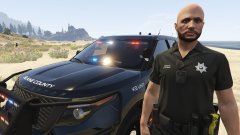
Upgrades for default EUP equipment that are in the works.

bfaith1407

Members

Very nice.😁😊

When will it be released?

I absolutely love the way that you set up the duty belt, especially with the collar mic stretched around the back.

That is exactly how I have my radio setup.

DAYDAY2018

Members

somebody answered the prayer

FarmerFinn

Members

do you got a link for these cars you got?


Join the conversation

You can post now and register later. If you have an account, sign in now to post with your account.

Guest
Add a comment...

Recently Browsing 0

  • No registered users viewing this page.

Account

Navigation

Search

Search

Configure browser push notifications

Chrome (Android)
  1. Tap the lock icon next to the address bar.
  2. Tap Permissions → Notifications.
  3. Adjust your preference.
Chrome (Desktop)
  1. Click the padlock icon in the address bar.
  2. Select Site settings.
  3. Find Notifications and adjust your preference.