Skip to content
View in the app

A better way to browse. Learn more.

LCPDFR.com

A full-screen app on your home screen with push notifications, badges and more.

To install this app on iOS and iPadOS
  1. Tap the Share icon in Safari
  2. Scroll the menu and tap Add to Home Screen.
  3. Tap Add in the top-right corner.
To install this app on Android
  1. Tap the 3-dot menu (⋮) in the top-right corner of the browser.
  2. Tap Add to Home screen or Install app.
  3. Confirm by tapping Install.
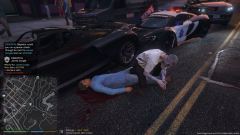
Halloween EMS

Halloween EMS

Album created by dbrown1986 · Updated

Playing a little LSPDFR on Halloween, and this was my EMS tech.

halloween_ems.png

PTRJason

Members

That just happened to me today. I was by the pier. I was laughing so hard. They showed up in some mad max type vehicle for fire and in a hearse for medics. They rubbed the blood on their faces. 


I have NO clue what mod was doing it because I did not install a Halloween mod, or the vehicles. But it was cool to see. Is it something built into GTA5?  

I handeled a call on the other side of the pier a few min later and everything that responded was normal. 

dbrown1986

Members

(edited)

I believe it may be Better EMS, because the RAGE engine itself is still responding to radiant emergencies with the stock ambulance.


If you don't have Better EMS, then it could be LSPDFR or RAGEHook doing it.

Edited by dbrown1986

Join the conversation

You can post now and register later. If you have an account, sign in now to post with your account.

Guest
Add a comment...

Recently Browsing 0

  • No registered users viewing this page.

Account

Navigation

Search

Search

Configure browser push notifications

Chrome (Android)
  1. Tap the lock icon next to the address bar.
  2. Tap Permissions → Notifications.
  3. Adjust your preference.
Chrome (Desktop)
  1. Click the padlock icon in the address bar.
  2. Select Site settings.
  3. Find Notifications and adjust your preference.