Skip to content
View in the app

A better way to browse. Learn more.

LCPDFR.com

A full-screen app on your home screen with push notifications, badges and more.

To install this app on iOS and iPadOS
  1. Tap the Share icon in Safari
  2. Scroll the menu and tap Add to Home Screen.
  3. Tap Add in the top-right corner.
To install this app on Android
  1. Tap the 3-dot menu (⋮) in the top-right corner of the browser.
  2. Tap Add to Home screen or Install app.
  3. Confirm by tapping Install.
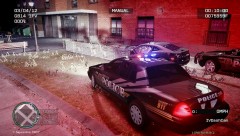
y not to run and pull a gun on the LCPD

y not to run and pull a gun on the LCPD

Album created by X Thunder · Updated
On 03/04/12 at 23:30hrs Sgt. Clark attempted to pull over a Black 2011 Camaro for running in to the back of his patrol car. Upon approach to the driver’s side door the Camaro began to flee. Sgt. Clark called of 10-94 and began pursuing the Camaro. When Sgt. Clark and two other officers got the Camaro stopped the driver stepped out of the vehicle, pulled a gun and started to shoot at Sgt. Clark. Sgt. Clark fired back striking the suspect the head killing him.

There are no comments to display.

Join the conversation

You can post now and register later. If you have an account, sign in now to post with your account.

Guest
Add a comment...

Recently Browsing 0

  • No registered users viewing this page.

Account

Navigation

Search

Search

Configure browser push notifications

Chrome (Android)
  1. Tap the lock icon next to the address bar.
  2. Tap Permissions → Notifications.
  3. Adjust your preference.
Chrome (Desktop)
  1. Click the padlock icon in the address bar.
  2. Select Site settings.
  3. Find Notifications and adjust your preference.