


Vehicle Vandalism
Album created by
DreLVMPD ·
Updated
Vehicle Vandalism
April 5th, 2014
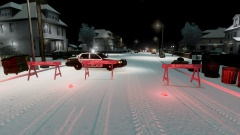
At approximately 1925 hours, LVMPD Officers were dispatched to a vehicle vandalism through the 311 system. Officer James Rodriguez of the Patrol Division was dispatched to the scene. After Officer James Rodriguez arrived on scene, he immediately began writing his report. At 2025 hours, Officer James Rodriguez turned towards the street to see a vehicle driving erratically southbound on Shinnecock Avenue; the vehicle broke through the barriers and hung off the edge. Officer James Rodriguez contacted dispatch and calmed the suspect down. Las Vegas Fire Department, Las Vegas Medical Services, and Search and Rescue officers were immediately dispatched to the scene. LVMPD Traffic Bureau Sgt. Gordon Brown was in the area, and arrived on scene first. Sgt. Gordon Brown ordered the subject out of the vehicle and checked his vitals. After LVFD, LVMS, and SAR arrived on scene, they secured the vehicle and the suspect. Sgt. Gordon Brown issued a field sobriety test on the subject; after the sobriety test, the subject was deemed under the influence. Sgt. Gordon Brown placed the suspect in custody at 2134 hours.
Released by:
Sheriff Dre
www.gta-lvmpd.com
Las Vegas Metropolitan Police Department Clan
LVMPD Alderney Convention Center Area Command Headquarters
April 5th, 2014
At approximately 1925 hours, LVMPD Officers were dispatched to a vehicle vandalism through the 311 system. Officer James Rodriguez of the Patrol Division was dispatched to the scene. After Officer James Rodriguez arrived on scene, he immediately began writing his report. At 2025 hours, Officer James Rodriguez turned towards the street to see a vehicle driving erratically southbound on Shinnecock Avenue; the vehicle broke through the barriers and hung off the edge. Officer James Rodriguez contacted dispatch and calmed the suspect down. Las Vegas Fire Department, Las Vegas Medical Services, and Search and Rescue officers were immediately dispatched to the scene. LVMPD Traffic Bureau Sgt. Gordon Brown was in the area, and arrived on scene first. Sgt. Gordon Brown ordered the subject out of the vehicle and checked his vitals. After LVFD, LVMS, and SAR arrived on scene, they secured the vehicle and the suspect. Sgt. Gordon Brown issued a field sobriety test on the subject; after the sobriety test, the subject was deemed under the influence. Sgt. Gordon Brown placed the suspect in custody at 2134 hours.
Released by:
Sheriff Dre
www.gta-lvmpd.com
Las Vegas Metropolitan Police Department Clan
LVMPD Alderney Convention Center Area Command Headquarters
5 images


Recently Browsing 0
- No registered users viewing this page.
0 Album Comments
There are no comments to display.
Join the conversation
You can post now and register later. If you have an account, sign in now to post with your account.