


8 Arrested in pre-dawn raid
Album created by
Premier ·
Updated
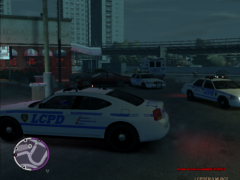
Eight people, including five pimps, are facing felony charges following a pre-dawn raid at the Triangle Club on Friday after a lengthy investigation in response to a rise in prostitution in Bohan.
The pre-dawn raid involved the LCPD's Emergency Services Unit in Operation Talon, the citywide crackdown on prostitution in Liberty City.
In addition to the arrest of eight people, police recovered illegal drugs from three of the individuals arrested, and subsequent searches from vehicles also revels illegal drugs such as marijuana and crack cocaine, as well as money that police suspect are the proceeds from both the sale of these said drugs and from prostitutes.
The five pimps that were in the Triangle Club were charged with promoting prostitution, conspiracy to promote prostitution, possession of drugs with intent to distribute, trafficking in persons, and aggravated trafficking of persons, and are held at the Liberty City Municipal Jail at Colony Island pending trial. If convicted, they could face up to 50 years in prison.
The three others that were arrested in the raid were charged with promoting prostitution, accessory to promoting prostitution before the fact, accessory to promoting prostitution after the fact, and obstructing police business and were also held the the Municipal Jail pending trial. If convicted, they face up to 30 years in prison.
The pre-dawn raid involved the LCPD's Emergency Services Unit in Operation Talon, the citywide crackdown on prostitution in Liberty City.
In addition to the arrest of eight people, police recovered illegal drugs from three of the individuals arrested, and subsequent searches from vehicles also revels illegal drugs such as marijuana and crack cocaine, as well as money that police suspect are the proceeds from both the sale of these said drugs and from prostitutes.
The five pimps that were in the Triangle Club were charged with promoting prostitution, conspiracy to promote prostitution, possession of drugs with intent to distribute, trafficking in persons, and aggravated trafficking of persons, and are held at the Liberty City Municipal Jail at Colony Island pending trial. If convicted, they could face up to 50 years in prison.
The three others that were arrested in the raid were charged with promoting prostitution, accessory to promoting prostitution before the fact, accessory to promoting prostitution after the fact, and obstructing police business and were also held the the Municipal Jail pending trial. If convicted, they face up to 30 years in prison.

Recently Browsing 0
- No registered users viewing this page.
0 Album Comments
There are no comments to display.
Join the conversation
You can post now and register later. If you have an account, sign in now to post with your account.