Skip to content
View in the app

A better way to browse. Learn more.

LCPDFR.com

A full-screen app on your home screen with push notifications, badges and more.

To install this app on iOS and iPadOS
  1. Tap the Share icon in Safari
  2. Scroll the menu and tap Add to Home Screen.
  3. Tap Add in the top-right corner.
To install this app on Android
  1. Tap the 3-dot menu (⋮) in the top-right corner of the browser.
  2. Tap Add to Home screen or Install app.
  3. Confirm by tapping Install.
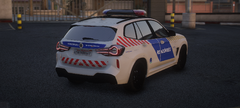
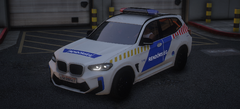
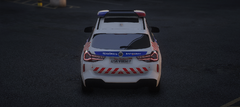
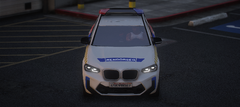
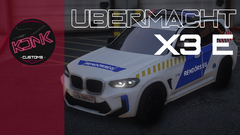
BMW IX3 | Magyar rendőrautó

BMW IX3 | Magyar rendőrautó

Album created by KDNK Customs · Updated
  • BMW IX3 


Fényhíd típusa: NON ELS

Matrica minősége: 4K


A fényhíd 6 féle LED felirat kiírását teszi lehetővé 

TORLÓDÁS --> QUEUE
LASSÍTS --> SLOW DOWN
KÖVESSEN --> FOLLOW
BALESET --> ACCIDENT
ÚTLEZÁRÁS --> ROAD CLOSED
KÖZÚTI ELLENŐRZÉS ---> TRAFFIC CONTROL


A járművet az alábbi linken találod meg: 
https://kdnk-custom.tebex.io/package/6653154
 

There are no comments to display.

Join the conversation

You can post now and register later. If you have an account, sign in now to post with your account.

Guest
Add a comment...

Recently Browsing 0

  • No registered users viewing this page.

Account

Navigation

Search

Search

Configure browser push notifications

Chrome (Android)
  1. Tap the lock icon next to the address bar.
  2. Tap Permissions → Notifications.
  3. Adjust your preference.
Chrome (Desktop)
  1. Click the padlock icon in the address bar.
  2. Select Site settings.
  3. Find Notifications and adjust your preference.