Skip to content
View in the app

A better way to browse. Learn more.

LCPDFR.com

A full-screen app on your home screen with push notifications, badges and more.

To install this app on iOS and iPadOS
  1. Tap the Share icon in Safari
  2. Scroll the menu and tap Add to Home Screen.
  3. Tap Add in the top-right corner.
To install this app on Android
  1. Tap the 3-dot menu (⋮) in the top-right corner of the browser.
  2. Tap Add to Home screen or Install app.
  3. Confirm by tapping Install.

Kernersville police department + Forsyth county sheriff Pack

Featured Replies

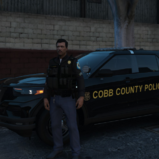
image.jpg.826661440b8001db7e62d8cd2b3caaimage.jpg.15e43f4b5f7c5937724df08eba6368image.jpg.8d681b9f9f8c7f0bb9729ff37f042cimage.jpg.b644c0d82a5aa6f8c9a757c99aa5dcResized_421399_FrontQuarter.jpg

PICTURE ABOVE IS WHAT I LABEL AS KPD CHARGER.

my old town has really nice looking cars and I wanted to request skins or models for them. Chargers usually use the last picture skin, cruisers use the one with horizontal blue stripes. The sheriff Impala/ cruiser  is nice, but we mostly see chargers for our sheriffs, so you don't have to bother using a cruiser or impala model if it's too much work. Those pictures of the sheriff cars was all I could find. Its all black with those goldish stripes.

I believe we use tahoes with the same skin as the charger above. Unmarked cars we don't need as the unmarked CVPI pack already resembles our unmarked cars.

State troopers have already been made by another modder. (Thank you)

Basically there are two skins needed for the Dodge Charger 2011 (sheriff + KPD charger) 

two skins for the Tahoe 2008 (sheriff + KPD charger skin) 

and two skins for the CVPI 1999 (KPD cruiser + sheriff)

Also our cops where light blue shirts with black pants if you wanted to do a uniform remodel. (Google it)

(Google Kernersville police department and you can get some more ideas of the models I'm talking about, just make sure the models your looking at on google match the ones on here)

If the community really likes these looks then I can try my best to get new models from our jurisdiction. 


Edited by Penguinsurfer
Terrible grammar, Made legible.

Join the conversation

You can post now and register later. If you have an account, sign in now to post with your account.

Guest
Reply to this topic...

Recently Browsing 0

  • No registered users viewing this page.

Account

Navigation

Search

Search

Configure browser push notifications

Chrome (Android)
  1. Tap the lock icon next to the address bar.
  2. Tap Permissions → Notifications.
  3. Adjust your preference.
Chrome (Desktop)
  1. Click the padlock icon in the address bar.
  2. Select Site settings.
  3. Find Notifications and adjust your preference.