Skip to content
View in the app

A better way to browse. Learn more.

LCPDFR.com

A full-screen app on your home screen with push notifications, badges and more.

To install this app on iOS and iPadOS
  1. Tap the Share icon in Safari
  2. Scroll the menu and tap Add to Home Screen.
  3. Tap Add in the top-right corner.
To install this app on Android
  1. Tap the 3-dot menu (⋮) in the top-right corner of the browser.
  2. Tap Add to Home screen or Install app.
  3. Confirm by tapping Install.

RacerX's Youtube Vids

Featured Replies

Hey all,


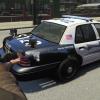
I just started farting around with making my own textures in photoshop, and so far I'm pretty pleased with the results.  If you feel so inclined, check out my youtube channel, there's some patrol videos up there with me and my friends, but I also do a walkaround of the vehicles every time I make new skins.  Check them out, if enough people like them, I'll start uploading them for people to use.  Also, please, tell me what you think!!  Thanks!!


http://www.youtube.com/channel/UCIMac81heqkN5_LYEz4KoIQ


FYI I download all my models either from here or from gtainside.com.

Edited by RacerX22288

Join the conversation

You can post now and register later. If you have an account, sign in now to post with your account.

Guest
Reply to this topic...

Recently Browsing 0

  • No registered users viewing this page.

Account

Navigation

Search

Search

Configure browser push notifications

Chrome (Android)
  1. Tap the lock icon next to the address bar.
  2. Tap Permissions → Notifications.
  3. Adjust your preference.
Chrome (Desktop)
  1. Click the padlock icon in the address bar.
  2. Select Site settings.
  3. Find Notifications and adjust your preference.