Skip to content
View in the app

A better way to browse. Learn more.

LCPDFR.com

A full-screen app on your home screen with push notifications, badges and more.

To install this app on iOS and iPadOS
  1. Tap the Share icon in Safari
  2. Scroll the menu and tap Add to Home Screen.
  3. Tap Add in the top-right corner.
To install this app on Android
  1. Tap the 3-dot menu (⋮) in the top-right corner of the browser.
  2. Tap Add to Home screen or Install app.
  3. Confirm by tapping Install.
The latest updated version of RAGE Plugin Hook, required to play LSPDFR, can be found inside the LSPDFR download. It is not currently available on the RAGE Plugin Hook website.

EUP - green texture on gun in holster?
Featured Replies

Hi,


So I installed EUP Menu, EUPRFR Basic Config, EUP Law and Order, EUP Search and Rescue, and then Jurisdictions+.  Side note, in the Jurisdictions installation guide, it said to "only copy ‘outfits_eup.xml’ and
‘inventory_eup.xml’ to lspdfr>data>custom" - 
These files weren't included in the EUP Basic Config, so I just installed Basic Config as normal.. maybe it's somewhere here lies my issue?


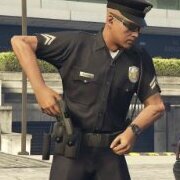
Firstly, I've no idea how to get the uniforms shown in the images (jackets, hi viz, traffic jackets etc) and my character and NPCs just look the same. Secondly, the cop NPCs have a green gun in their belt, which I'm presuming is just part of the model textures. I think the gun texture is missing. I've included a picture to show.


I seem to have messed up the install since I don't actually know which order to install EUP and all its additional files and packs, and this is probably where I went wrong. When I hit F4 to bring up the console, there are some lines which say "failed to find outfit lspd_class_b" or "failed to find outfit "fib_agent" (or something to that extent).


So far this hasn't caused any issues, but I'm not sure where I went wrong and if I should just reinstall the entire game and leave EUP since I don't know how to work it or notice any changes.


Many thanks for the help!


yUtbaRh.jpg


Edited by MrAlways

Hey!

  • Author

Update: I called in backup from Noose, Gang Units, USAF, National Guard etc just to see their uniforms and pretty much all of them bugged - missing textures, wearing parachutes etc. 

Hey!

  • 1 year later...

Hey man! Late to the party here. Just wanted to say that the green tint on that weapon is actually supposed to be there, because it’s a taser. Also, I had the same exact problem as you. I had dudes spawning, using ultimate backup, with all these weird clothing configurations! Weird, right? Well, unless you have a lot of time, and you really know what you are doing down to a T, you can’t really edit them yourself! Now, there are different files that have been released throughout LSPDFR and GTAPoliceMods that let you actually have the peds spawn with all the correct uniforms! You need to make sure to always download the most up to date files. A lot of these files that are still on here have not been updated for the longest time. Hell, I saw one just the other day that was optimized for EUP Beta! That hasn’t been out for a while! I will link some of the files tomorrow, so you can use with your game, if that is still an issue for you!! 

This is a support topic.
Only reply here to offer help or assistance to MrAlways. Off-topic or "me too" replies will be removed.

Need support yourself? Make a new topic instead.

Join the conversation

You can post now and register later. If you have an account, sign in now to post with your account.

Guest
Reply to this topic...

Similar Content

Recently Browsing 0

  • No registered users viewing this page.

Account

Navigation

Search

Search

Configure browser push notifications

Chrome (Android)
  1. Tap the lock icon next to the address bar.
  2. Tap Permissions → Notifications.
  3. Adjust your preference.
Chrome (Desktop)
  1. Click the padlock icon in the address bar.
  2. Select Site settings.
  3. Find Notifications and adjust your preference.