
Skip to content
View in the app

A better way to browse. Learn more.

LCPDFR.com

A full-screen app on your home screen with push notifications, badges and more.

To install this app on iOS and iPadOS
  1. Tap the Share icon in Safari
  2. Scroll the menu and tap Add to Home Screen.
  3. Tap Add in the top-right corner.
To install this app on Android
  1. Tap the 3-dot menu (⋮) in the top-right corner of the browser.
  2. Tap Add to Home screen or Install app.
  3. Confirm by tapping Install.
Due to overzealous filtering on Microsoft’s side, some emails to Outlook and Hotmail addresses may not be delivered. If you’re affected, please use a different email address or try again later.

BOLO - December 2017


Welcome to BOLO - our new monthly video series showcasing some of the best GTA 5 mods on offer over the past month.


  • in Vehicle Models
    McCreary
    10461   41   23
  • I've always loved the Caprice. introduced in 1965 this bad boy quickly became the choice for police departments at the time. I was excited to see the vehicle come back with a well-deserved makeover. This vehicle model reflects that to a T. 

    BlakeM did a fantastic job getting this bad boy all up and running in Los Santos!
  • in Vehicle Models
    DcK
    93941   53   17
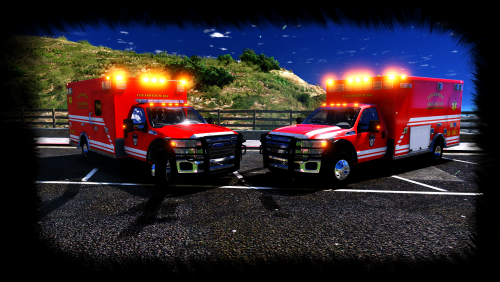
  • When you absolutely have to have the best. The 2015 Ford Rescue Medic is a fantastic addition to Los Santos' fire departments. With amazing detail both inside and out, you will be hard-pressed to find another model like it.

  • in Vehicle Models
    Candice
    8723   31   15
  • Chevy Silverado, introduced in 1998 and still truckin  (pun intended). With a minimum of 285 horsepower, this vehicle will give your County Sheriffs a new, unmarked way, of tracking you down.

    With a towing capacity up to 7,400 lbs, this would be a welcome addition to your LSPD fleet. Fantastic details and a beautiful livery, this one is hard to pass up.


Account

Navigation

Search

Search

Configure browser push notifications

Chrome (Android)
  1. Tap the lock icon next to the address bar.
  2. Tap Permissions → Notifications.
  3. Adjust your preference.
Chrome (Desktop)
  1. Click the padlock icon in the address bar.
  2. Select Site settings.
  3. Find Notifications and adjust your preference.