majorpaine2015
Members
-
Joined
-
Last visited
Everything posted by majorpaine2015
-
Remove from 18 and place in patchday3ng
-
Can you tell me where you installed the vehicle?
-
what's the pack name?
-
It seems you may have missed something, can you post any images of the ytd file, and where you installed the files, or better yet send the link to the vehicle you downloaded and i'll try it in my game and tell you what's what.
-
Did you add the correct shaders for the vehicle components and did you add all of your textures to both sheriff txd files?
-
-
open your materials editor and place your lightemissive textures above your vehglass texture for the windows. In your hierarchy place your lights above you windscreen.
-
Traffic Policer
-
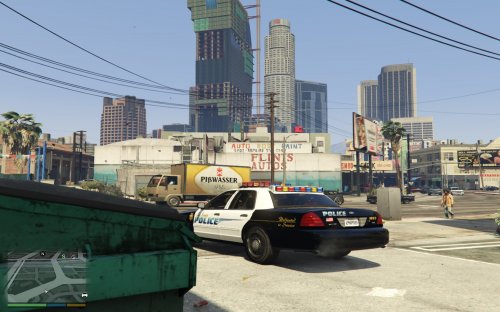 Hello all, I made this because it is a rare light bar and have never been release but showcased in the gallery. I don't like things like that. I like to share and before you ask why i didn't make the front light bar is because i really only wanted the rear, but if enough people want it then i will make and release it. In order to make the lightbar the color of your vehicle you would have to uv map it to your vehicle skin/sign. You may edit or modify the textures to fit your needs. You may use in roleplay, clans,etc. You may take pics and vids and only link to LCPDFR.com. You may not steal, rip, modify, or sell this mod. You may not edit and claim as your own. You may not post to any other site without expressed permission.
 -
Your dummies has to be in the center of the wheel and our axis has to be in the center of the dummies.
-
just rename them to something else. check your wheel dummies also.
-
Are those wheels attached to some part of the vehicle?
-
Those objects are flashing because they are extras and your lights aren't because they extras. As for your bumpers, check your dummies and see where they are located and reset you your axis.
-
i need an image or vid of what you are referring to.
-
In your hierarchy you"ll see objects with the same exact name
-
extra_1 primary extra_2 primary extra_3 primary extra_4 primary extra_5 warning extra_6 warning extra_7 secondary(traffic)left extra_8 secondary(traffic)middle extra_9 secondary(traffic)ride extra_10 steadyburn extra_11 takedowns(front) extra_12 scene lighting(sides)
-
Thi vid is the closest i can find to scaling an object.It's because he made them that way, as with some of the other authors and they're mods. You have to scale them down to fit how you want. So it's not an error or anything.You're welcomeTry resetting the chassis dummy and axis to world.And on a side note make sure it has the flag FLAG_HAS_INTERIOR_EXTRASThat's what i was saying...lolYour textures for the interior is using mesh as a materials setting which by the way is used for chrome or mirrors. Change your settings to interior2. Your windows are you another windows texture that may have the same name as the one you want to use. Rename texture to something else.Did you make the vehicles?