


majorpaine2015
Members
-
Joined
-
Last visited
Everything posted by majorpaine2015
-
This vid gives you the basic concept of doing it, just petend it's the glasses you want
-
Then you would have to edit the contents of the file with zmodeler3.
-
All you have to do is drag and drop the files onto your desktop, Yes it would remove the glasses for the hat as well. So if the hat you want has glasses then those would be used.
-
Did you reposition the dummies to the proper position and reset the lightbar to the parent, and are you using els or non els for the model?
-
All you have to do is extract the files for the hat that you want, rename them to the hat you don't want and drag and drop them into openiv overidding the hat you don't want.
-
make sure you have your shader quality and post fx in your graphics settings set to they're highest settings and use a visualsettings.dat mod like radiance v.
-
But without scripthookv we are lost in the wind, unless there's some proof that he's currently working on an update i don't know what to think.
-
Hello everyone, excuse me if this is in the wrong section but anywho, i am a bit concerned. I've been constantly on the scripthookv website for the past couple of days hoping for an update because of the gta v update my game became broken and even though i have a backup it still didn't fix my game. But to the point Alexander Blade was a member of the Openiv team which you know has been disbanded and now all scripthookv downloads have vanished. I'm concerned for me and all those who have updated they're games and are waiting for the new scripthookv to be released that we may not be able to use mods anymore. Please correct me if i'm wrong, maybe he removed them in order to upload a new version but this looks like the end of modding as we know it.
-
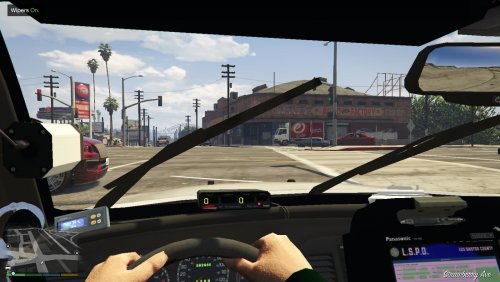 I would be happy to get it back working for you, post me the sheriff section of your vehicles.meta file and i'll take a look to pinpoint the issue. You will need to make sure your postfx and shader settings are at max setting and if it still isn't bright enough then i can provide you with my visualsettings.meta file that will make them really bright. Make sure you are using the wipers mod from gta5-mods.com, and also post me your sheriff settings from your vehicles.meta file and i'll see what i can do.
- 49 comments
- 22 reviews
-
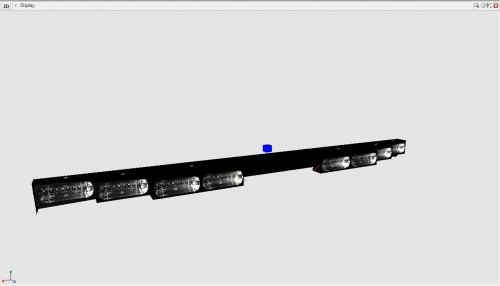 It should since i scratch made it....lol.
 -
No description Necessary.....It is what it is Just place in hierarchy and attach extras to other extras and BOOM.....done
-
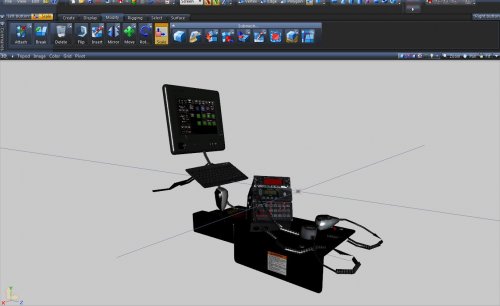 This console has an els enabled screen released as a dev part. To install attach the appropriate emissive lighting to the els lighting of the same name. You do not have to attach the head and tailight emissive to the head and tail meshes It comes as yft and z3d files with textures for your choosing. enjoy and happy gaming.
 -
You Need Ragehook, scripthook, and openiv . it should install required files for using mods
-
Yes it's possible
-
Hello all, i'm currently modifying my vehicles to be els compatible and i have all lights working except for extra_9. It's like it's on steady burn which is not enabled in the vcf. Any one know of a fix.
-
They are correct, it not els complatible, just els style lighting.
-
It's because the ram bar and the spotlight are named as an extra. You can fix this by naming the parts something else like misc_a-z Just a side note, if the car is locked then you would have to contact the author to fix it.
-
I have a freightliner inspiration that i purchased and have nothing to do with it, so maybe i'll take on this project.
-
Are you using a mods folder?
-
Did you put it in the correct destination?
-
What exactly do you mean by it dosen't work.
-
The sheriff2 info in the file is a mistake, It was only supposed to contain the info for sheriff. Only copy and paste the sheriff info into your vehicles.meta file. No you don't need to rename the file. Sorry for the mixup dude...lol The sheriff2 info in the file is a mistake, It was only supposed to contain the info for sheriff. Only copy and paste the sheriff info into your vehicles.meta file. No you don't need to rename the file. Sorry for the mixup dude...lol
-
 It means you may have place the vehicle in a slot that uses a different sirensetting. You would have to change the siren setting to 13 in your carvariations.meta file to fix this. The reason for that is because i was making the spotlight able to turn up and down on command but then changed my mind. What ever slot you place the car you have to change your sirensetting to 13 in your carvariations file to fix it. As far as brightness, it depends on your graphics settings. turn your postfx and shader settings up to they're highest settings and maybe use radiance v. Well as an option the lightbar is an extra so you can play without it. I'm gonna try it to see if it works.
- 48 comments
- 14 reviews
-
That's the issue i'm still trying to figure out. I want the flash patterns to apply to that one vehicle and not to all. If you find the answer please let me know. That's weird because on my game it didn't work, it just kept spawning the stock vehicle. It may be because i'm using other vehicles in that patchday folder which also contains police3 in it. Yes, it will work for all mods and scripts.
- 48 comments
- 14 reviews
-
-

- 1
-
-
I didn't make the skin, a friend gave it to me and i just ran with it...lol What is rde? Never heard of it but you can give it a try The reason for the coronas showing like this is because i was making the car off a vid i liked and there's only a certain amount of front facing sirens, so in order to put 2 sirens in each door i had to use the back facing ones. However you can eliminate this by using the corona begone mod here. https://www.gta5-mods.com/paintjobs/corona-begone If you read the decription in the downloads section it tells you where to install the car, it's not x64e I'll update it so you'll have the option of single or dual spotlights.
- 48 comments
- 14 reviews
-
-
- 2
-
