


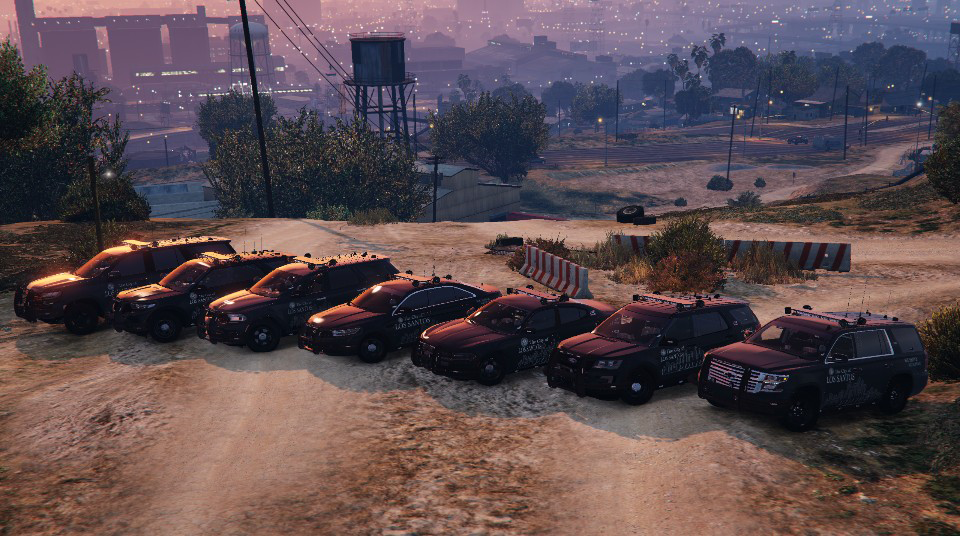


Features:
-PIP's ALPR's mounted to lightbar.
-Optional, use extra_10.
-Takedown Lights.
-Alley Lights.
-The spotlight emis does not work with these enabled (I am working on that).
-ELS pattern changes with sirens.
Thank you @Parzival for helping work out the kinks.
-A big thanks again to him for this showcase video!
Thank you @SnickersClassicTTV for the showcase video of the updated pack!
As Always, Please Enjoy 🙂
Edited by OfficerArk
What's New in Version 1.0.4
Released
1.0.5 Update
-Added separate DLC packs for Red/Blue & Blue/Blue.
-Files have been checked and everything works in game.
Coming Soon:
Tintable windows.
----------- -----------
Previous Updates
------------------------------
1.0.4 Update
-All blue 2015 slicktop Tahoe added.
-2016 FPIU dashboard textures fixed.
1.0.3 Update
-Changed Charger's handling line to stop from crashing game.
1.0.2 Update
-Removed separate models with no ALPR's.
-You can now use extra_10 in a trainer to enable/disable them.
-Templates Included
1.0.1 Update
-Liveries have been updated to reflect old version.
-Next update will have a few different liveries for each vehicle.
-Charger has been greatly reduced in size for both the model and textures.
-I can still spawn the model, so I am hoping this solves some issues for people.
-Still looking into the non-synced steering wheel. Will require time as I will need to edit both the base models and meta files.
1.0.0 Update
This release introduces 3 new vehicles and an overhauled livery generously made by @Parzival, this release wouldn't have been possible in this time frame without his help.
-Minor bug fixes for existing vehicles.
-Charger lights fixed; they look normal now. (I think the antennas might be still synced with the trunk; I'll look into it)
-Maybe others, but I'm tired.
-2021 Durango
-2016 Ford Explorer
-2016 Taurus
These include both Red/Blue and Blue/Blue variants as well as optional ALPR's
IMPORTANT - This pack now has 2 DLC folders. You will need remove the old version of this pack before installing the new update.
More than a few hours have gone into this pack, and I really do appreciate feedback. If you find anything wrong or have new ideas, please reach out.
As Always, Please Enjoy 🙂
Upcoming Vehicles:
-2014 Charger
-A Truck (Don't know which one yet)
-Unmarked Units
0.0.2
1 Vehicle Update
-2015 Unmarked Tahoe
-ALPR's mounted on push bar.
0.0.1
3 Vehicle Update
-2018 Charger
-2015 Tahoe
-Some QOL edits by me including breakable windows and proper taillights at night.
-IGNORE the white flashing box on the front right bumper, it will disappear once you've driven around for a few seconds.
-2021 Tahoe
Each Vehicle Includes a Red-Blue & Blue-Blue option as well as optional PIP's ALPR's
REMOVED Replace files for the time being. Please be patient!
Updated a few things from the original release.
-Removed front push-bar light module
-Added mirror takedown lights & side runner alley lights.
More photos eventually (If you have/take any, DM me and I will use them!)
Short Description
-Credits-
-------------------------------------------------------------
2020 Ford Explorer
-2020 FPIU base model originally by Turbosquid; remodeled, textured, and converted to GTA V by Kane104,
-Windows remapped to remove green tint
-Rear lights remapped for more realistic lighting
2018 Dodge Charger
-2015 Dodge Charger from Forza, edited into 2018 Dodge Charger Pursuit by Matt with parts from FH3 and Gamemodels
2021 Chevrolet Tahoe
-2021 Chevy Tahoe PPV by RAZ3R - @OfficerTenPenny
2015 Tahoe
-GeorgieMoon.
Misc Equipment:
-2020 FPIU Westin Pushbar Elite modelled, textured and converted to GTA V by Ainsley Harriot#0420
-PIPS plate readers Modeled by HP Deskjet
-Soundoff 3000 lumen work light scratched modeled and textured by Krul
-Pro-guard seat organizer made by ErinLindsay for GTA IV
- Converted to GTA V by Koduuh
- Decatur Genesis I scratch modeled, textured, and converted to GTA V by HDgamerzPC
- Decatur Genesis II Select scratch modeled, textured, and converted to GTA V by HDgamerzPC
- Decatur Dash Mounted Radar scratch modeled, textured, and converted to GTA V by HDgamerzPC
-Window Bars by OfficerUnderwood - FPIS/FPIU/14-Tahoe/2011-CVPI
-Partitions by Twurtleee
-Starchase Launcher - Bradstr090
-Feniex Tritron by Raz3r
-Whelen Ion Pedestal Mount by Syncc
-Pushbar Power Connector
-Modelled & Textured by Terry Sloman
-Textures by Terry Sloman
Lighting:
-Code 3 RX2700 modeled and textured by Cj24.
-Interior Lights modeled and textured by Bueno
-Spotlight Created By Turn10Studios; Converted And Edited By Shmurda
- Soundoff PAR46 LED Insert Created By Shmurda
- Spotlight Mounting Bracket From GameModels.RU
Top Equipment:
-AP antennas modeled and textured by Cj24.
-Misc. antennas by Raptor2000 and Dirty Dan
-Laird B8065CN Antenna Modeled, Textured by VooDoo. Textures by VooDoo. Converted to V by VooDoo
-PCTel Trooper LTE antenna modeled and textured by Rep
Trunk Equipment:
-Scratch modeled by BC Designs
-misc. equipment made by MarkTheDev & Rockstar Games
-Nitrile exam gloves made from scratch and textured by RogersCustoms
-Ammo boxes by Rockstar Games
-Narcan by Othrin
-Stopsticks
-Fletcher - Model
-Tkphantom - Textures
-Fire Extinguisher
-Modeled by Vartanyan (Turbosquid)
-Converted by breakehh_
Interior Equipment:
-Stalker Dual DSR + Dual button display - HP Deskjet
-Partitions by Twurtleee
-Console by Twurtleee
-Code 3 Xcel Siren Controller & Microphone by Raz3r
-Motorola Dashcam & Display modeled and textured by Raz3r
-iFORCE MDC setup
-Model/Tex - HP Deskjet
-Screen emis from ELS Caprice Console
-Moddeled by majorpaine2015
-textured by majorpaine2015
-converted to gta v by majorpaine2015
-Black-Rac Rack modeled and textured by Frost88
-M4 Rifle off Turbosquid and converted by Frost88
-Shotgun
- Modelled - andervyd
- Textured - andervyd
- Converted to GTAV - Freddie F.
Livery:
-Texture by me
-Font by Tomi Haaparanta
-------------------------------------------------------------
More to come ;)





![San Andreas State Police EUP Package [ADDON & REPLACE]](http://s3-screenshots.int-cdn.lcpdfrusercontent.com/resize/500/-/monthly_2026_06/Screenshot2026-06-08203439.thumb.png.29bdbd37686c4d228bc72af27eb63202.png)



![[ELS][REPLACE] Škoda Kodiaq 2022 Czech Police with ram](http://s3-screenshots.int-cdn.lcpdfrusercontent.com/resize/500/-/monthly_2026_06/20260608220206_1.thumb.jpg.cadf7c0c040b4cdd87f227196b646eeb.jpg)








Recommended Comments
Create an account or sign in to comment